Know what to promote and what to change next
How to run X Ads with AI
Let your agent do the campaign prep and reporting. Start with posts your audience has responded to, then judge the ads by what you wanted people to do.
On this page
Spend less time in Ads Manager, make better campaign decisions
You can spend an afternoon setting up Twitter ads and still be unsure which post deserves the budget. Generating more ad copy doesn't solve that decision.
To run X Ads with AI, give your agent a business goal, account context, and access to the official X Ads MCP. Use PilotMyX to examine your posts and prepare copy in your voice. Then have the agent prepare a campaign, launch within your approved limits, and compare the results with the outcome you wanted.
This guide describes that workflow with reusable prompts. It's a proposed process, not a report of campaign results or a promise that AI will make your ads profitable. The X documentation linked below was checked on September 16, 2026.
What handles each part of the work?
The AI agent makes recommendations and calls the connected tools. PilotMyX supplies context about your account and handles your approved organic posts. X Ads handles the advertising.
| Part | Job in this workflow | What you get back |
|---|---|---|
| PilotMyX | Read your posts, your replies, and their available results; prepare and schedule approved posts | Examples of your voice and evidence for choosing what to publish or promote |
| Official X Ads MCP | Read campaign data and perform authorized advertising actions | Campaign settings, advertising results, and confirmation of changes |
| Website analytics or your product database | Measure what visitors do after arriving | Signups, activation, purchases, or another defined business event |
| Your AI agent | Connect the evidence to your goal and carry out the work you authorize | A shortlist, campaign plan, and a reason for the next decision |
MCP is the connection that lets an agent use tools. The official advertising server is https://ads-api.x.com/mcp. X documents campaign reads and writes, analytics, targeting, and creative management. Access depends on your X app, advertising account, and permissions. Follow the official X Ads MCP connection instructions for your client.
For the organic side, follow the PilotMyX agent setup guide. You need an agent that supports the required connections; the workflow isn't tied to one AI brand.
1. Define the result before asking for a campaign
"Grow my account" leaves too much open. More impressions, relevant followers, and product signups are different outcomes. An agent needs to know which one matters and how you'll measure it.
For a running example, imagine a founder selling software that helps independent shops handle returns. The founder wants shop owners to try the product. A popular post about startup life might attract attention, but a useful post about returns is closer to that goal.
Write a brief with:
- The customer and the problem your offer solves.
- The action you want them to take, plus the page or profile they should reach.
- The event you'll use to judge the result and where it's recorded.
- The approved spending limit, currency, dates, and account timezone.
- What the agent may do now and which changes need a separate approval.
X distinguishes objectives such as website traffic, engagement, and website conversions. Select an available objective that fits the brief and your measurement setup. A business goal like gaining relevant followers isn't, by itself, the name of a configurable campaign objective. Check the current X campaign objectives rather than copying settings from an old tutorial.
For the shop software example, likes are supporting evidence. Completed signups matter more. Before choosing a conversion objective, verify that the intended event is being collected correctly.
2. Find posts that give you a reason to test
Use PilotMyX to review a concrete period, such as the last 30 complete days. Read the posts alongside available impressions, link clicks, profile visits, and engagement. Compare posts with a similar purpose and account for their age: yesterday's post hasn't had the same time to collect results as one from last month.
Your agent can also read the replies you've written to understand how you explain the problem in conversation. Keep that voice analysis separate from the ranking of original posts.
In the example, suppose the account has a broad founder joke, a product announcement, and a post explaining a common returns mistake. The joke may have the most likes. The returns post may still be the better candidate because the problem, reader, and offer fit together. That's a hypothesis for a paid test, not proof it will convert.
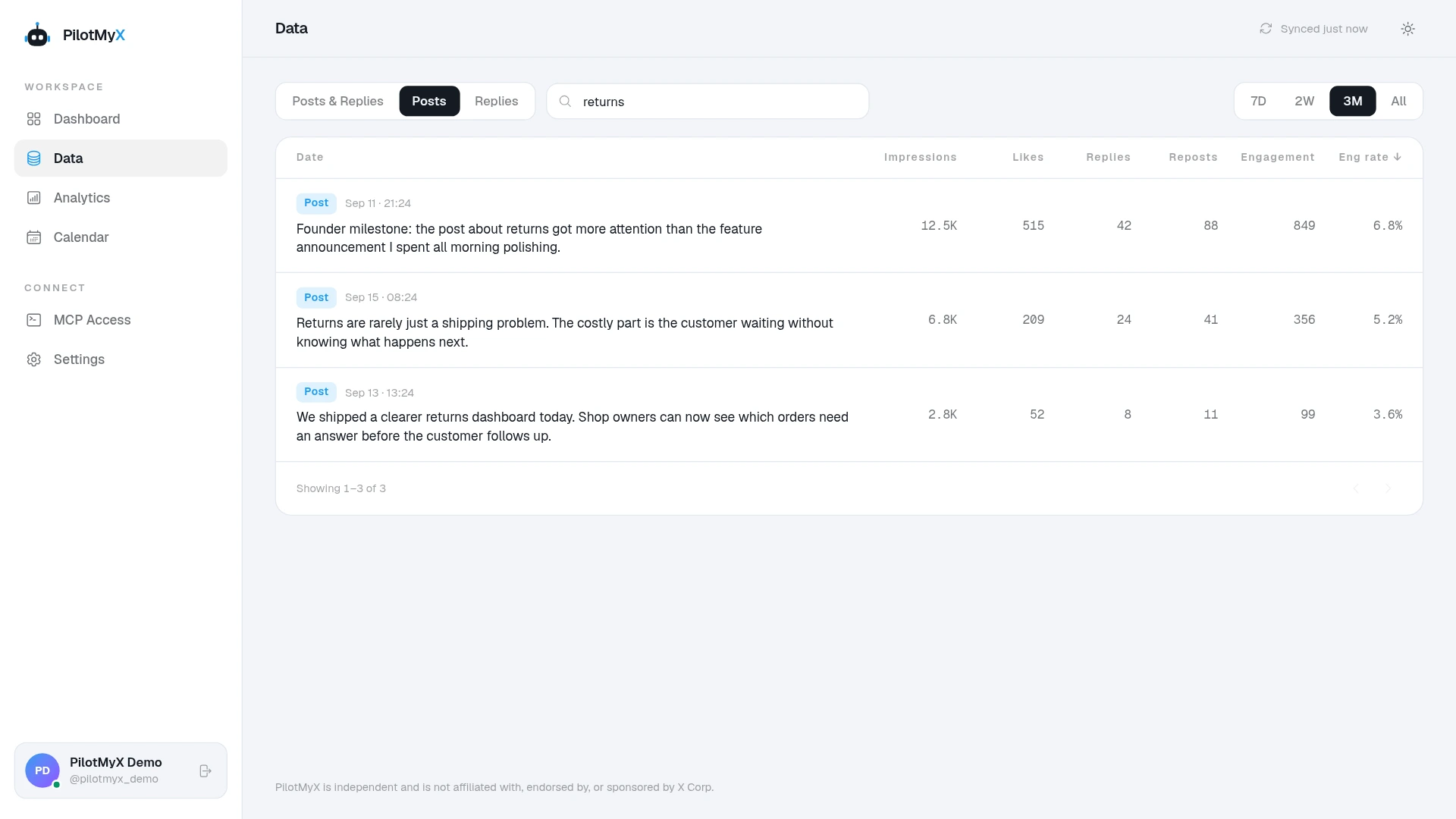
One measurement detail matters before you shortlist anything: a promoted post's public totals can include both organic and paid results. X describes this in its post metrics definitions. PilotMyX doesn't provide a native paid-versus-organic breakdown. Use posts known not to have been promoted, or a verified observation from before promotion. If that history is unknown, keep it unknown.
Try this prompt after filling in your brief:
Help me choose posts for an X Ads test. My offer is [offer], my intended customer is [customer], and my goal is [measurable action].

Use the last 30 complete days of posts available in PilotMyX. Show the dates, timezone, sample size, and metric freshness. Read the relevant result pages and compare posts with similar purposes, noting their age.

Shortlist up to three candidates. For each, give the post link, the problem it addresses, available impressions and goal-relevant metrics, and a reason to test or reject it. Keep missing metrics separate from zero.

Check the available advertising history through X Ads using read-only access. Only describe results as organic when the evidence supports that. Keep uncertain promotion history explicit.

Use my own replies separately for voice examples, not as candidate ads. Explain what a paid test could teach us. Don't refresh PilotMyX data, create anything, or change a campaign.
If the shortlist is empty, write a new post around a relevant problem. You don't need to advertise an unrelated winner just because it already has likes. The guide to choosing what to post from your data goes deeper into that decision.
For a worked selection example and a more detailed review prompt, use which Twitter posts are worth promoting.
If your goal is to attract followers, the Twitter audience-growth guide connects the promoted post to your profile, next posts, and measurement plan.
3. Prepare copy that still sounds like you
Give the agent the selected post, a few representative examples of your writing, the offer, and the facts it can use. Ask it to explain the benefit to someone who has never heard of you.
For the shop founder, that might mean replacing an internal product update with an explanation of the returns problem the product addresses. Keep a specific example the founder can support. Don't let the agent invent a customer quote or a time-saving claim to make the ad stronger.
Review the draft using two questions: would the intended customer recognize their problem, and does the destination deliver what the post promises?
You can prepare and schedule an approved original post through PilotMyX. If you plan to promote that post, wait until it's published and retain its actual X post ID. A scheduled draft isn't a published post you can associate with an ad. The guide to writing Twitter ads with AI shows how to build a control and variations that change one creative decision at a time. Use the separate voice guide when your agent still needs representative examples and editing rules.
4. Prepare the campaign, then verify what was created
Ask the agent to turn the approved brief into specific settings before creating anything. Check the audience, destination, creative, objective, and budget together. A sensible post shown to the wrong audience is still the wrong campaign.
If you plan to use follower lookalikes, build the handle shortlist around a specific customer problem before creating targeting. The follower lookalike account-selection guide explains how to research, group, and verify those audience hypotheses without pretending you can target an exact competitor follower list.
Once you've approved those settings, the agent can create the paused campaign and ad group through X Ads. The MCP calls an ad group a line item. X documents separate activation for campaigns and line items; creating them paused is not a launch.
For an existing post, the official tool reference includes promote_post. The reference also lists the campaign and line-item tools used to read back the resulting setup. See the X Ads MCP API reference.
Use a bounded creation prompt after the plan is approved:
Create the campaign described in the approved brief below, paused, in X Ads account [account ID]. First check whether this campaign already exists; don't create a duplicate.

Approved brief: [exact objective, audience, placements, post ID, destination, currency, budget settings, start/end dates and timezone].

If a required setting is unsupported or missing, stop and explain it instead of substituting another. Keep the campaign and line item paused. Don't activate them or modify existing campaigns.

Read back the saved campaign, line item, targeting, and associated post. Compare them with the brief. Return their IDs, saved settings, and any mismatch so I can review the actual setup.
Read the returned settings before authorizing activation of those exact IDs. After activation, ask the agent to read the status again. An active setting doesn't prove that an ad has delivered; check delivery and spend separately.
Keep enforceable limits in the advertising configuration and the agent's permissions. A sentence in a prompt isn't a hard spending cap.
5. Review what happened before changing the budget
Your first report should help you decide whether to continue, investigate, or change one thing. A page of metrics without a recommendation just gives you another screen to read. The X Ads measurement guide shows how to keep post context, campaign delivery, website visits, and business events tied to their own sources.
For the shop software campaign, follow the path from advertising spend to visits, then completed signups and product use. PilotMyX helps explain the content; X Ads supplies advertising results; your website and product records supply the business outcome. Don't ask PilotMyX to calculate an advertising acquisition cost from post engagement alone.
A click reported by X isn't the same event as a recorded website visit. Page loading and measurement rules can produce differences, as X explains in its analytics discrepancy guide. Check the destination and tracking before blaming the audience. Use the Twitter website-traffic guide to keep campaign links and site reporting consistent. If clicks arrive without signups or sales, follow the conversion troubleshooting guide to locate the first failing step.
Review campaign [ID] for [completed date range] in [timezone]. This is a read-only review.

Use X Ads for spend, delivery, and available advertising results. Use [authorized website/product data source] for visits and [our success event]. State the source, reporting window, attribution settings where available, and freshness of each measure.

Show what happened to the promoted post and the business goal. Don't combine incompatible reporting windows, treat missing values as zero, or describe mixed post totals as organic performance.

Give a recommendation: continue the test, investigate a measurement problem, pause for review, or propose one specific change. Explain the evidence and what remains uncertain. If the sample is too small to support a decision, say what additional evidence is needed.

Return the next review time and record the recommendation. Don't change budgets, targeting, creative, or campaign status.
An inexpensive click with no useful action afterward isn't automatically a good result. Nor does one signup establish a reliable acquisition cost. Let the amount and quality of evidence determine the decision rather than asking the agent to find a winner every morning.
How much of this can you automate?
An agent can prepare campaigns, retrieve results, and carry out authorized changes through connected tools. Recurring reviews also need a scheduler in the agent's environment. Connecting an MCP server alone doesn't make the agent run every day.
Start by automating a read-only report. Confirm that it uses the right account, complete reporting periods, and the intended success event. For later campaign changes, define permitted actions, real budget controls, and what should happen when data is missing or a tool fails. Keep a record of the setting before and after each change.
If every review produces new copy, a different audience, and a higher budget at once, you'll struggle to learn what helped. Prefer a specific proposed change with a reason you can inspect. Sometimes the useful decision is to leave the campaign alone until you have more evidence.
Your first campaign checklist
Before launch, you should be able to answer each of these:
- What do we want the reader to do, and where will we measure it?
- Why does this post fit that reader better than the other candidates?
- Do we know whether the selection data includes previous promotion?
- Does the saved campaign match the approved audience, budget, dates, and post?
- Who or what will review delivery, spend, and the business result, and when?
Start with the post selection. Connect PilotMyX to your agent, examine what your account has already published, and choose one idea worth testing. You'll have a concrete reason for the campaign before any money goes behind it.
Use your own account