PilotMyX getting started
How to Set Up PilotMyX With Any AI Agent (Claude/Codex)
Generic prompts cannot see what works on your account or how you naturally explain an idea. This guide connects PilotMyX to an AI agent (Claude/Codex, for example), so its advice starts with your X/Twitter data instead of guesswork.
On this page
Before you start
An AI agent can draft a plausible X/Twitter post without knowing anything about you. That is the problem: the result may be polished, but it has no reason to fit your audience, your account, or the way you actually write.
PilotMyX gives the agent the context it is missing: your posts and replies, the results attached to them, your voice notes, and your publishing calendar. The agent still does the thinking and writing. PilotMyX supplies the account data and only the actions you allow.
You will need:
- an X/Twitter account;
- a PilotMyX account;
- an AI agent that supports MCP (Claude/Codex, for example).
Once your X/Twitter account is connected, the first import takes a few seconds. Start with read-only access. You can add drafting and scheduling permissions later, once the workflow has earned your trust.
1. Connect your X/Twitter account
Open PilotMyX and select Analyze my X account. X handles the sign-in, so PilotMyX never asks for your X password. Once you return to PilotMyX, give the first import a few seconds to finish.
2. Create read-only access for your agent
Open MCP Access from the PilotMyX navigation and create a token named after the agent, such as My agent - read only.
Leave the write permissions off for this first connection. The default read permissions let the agent inspect your account, analytics, drafts, and publication status without changing anything. Choose an expiry that fits the device you are using.
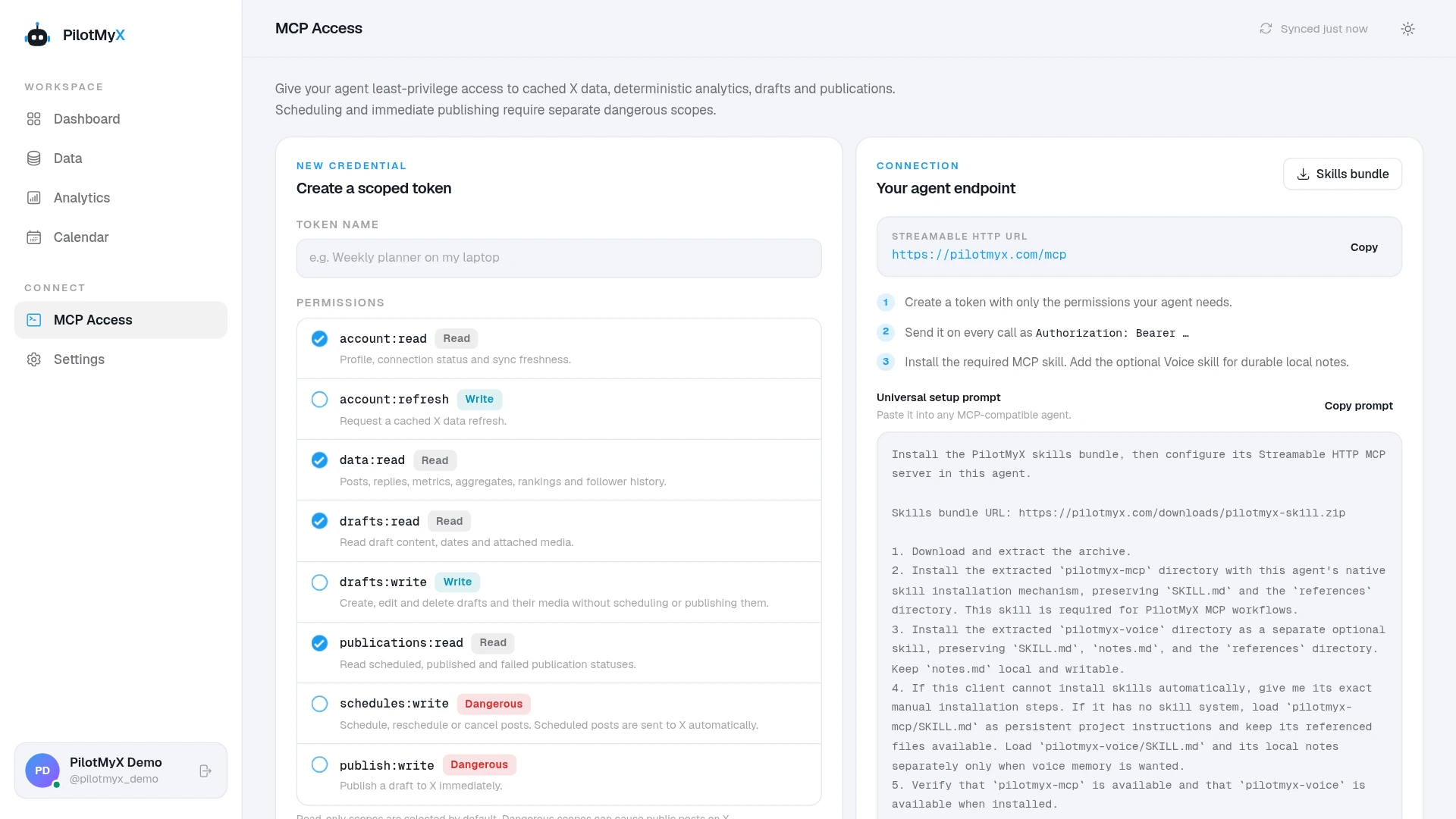
PilotMyX shows the token once. Copy it immediately and keep it in the secure environment or secret storage used by your agent. Do not paste it into a public post, screenshot, or tracked configuration file.
If you lose it, revoke it and create another token. There is no reason to keep an exposed credential alive.
3. Copy the universal setup prompt
On the same MCP Access page, select Copy prompt and paste it into a new conversation with your agent.
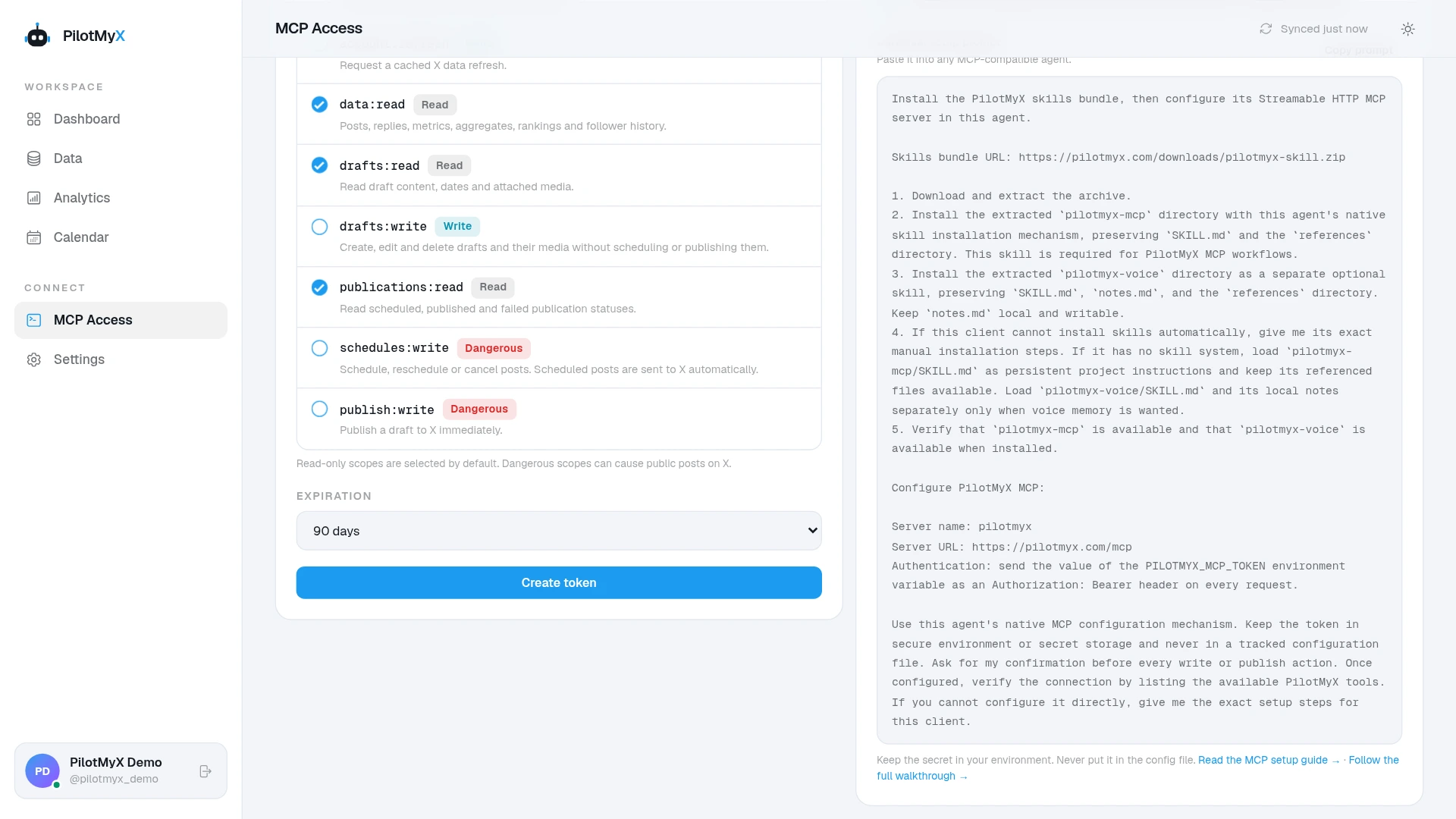
You do not need to download or install the skills bundle yourself. The prompt tells the agent to download the current bundle, install the PilotMyX skills, connect the MCP server, and keep the token out of tracked files. If the agent cannot complete part of the setup automatically, the same prompt tells it to walk you through the exact action required in your client.
The bundle contains two skills:
pilotmyx-mcpteaches the agent how to work from your X/Twitter data, compare useful samples, and ask before it takes a write action;pilotmyx-voicemaintains local voice notes from your published examples, your preferences, and the context you choose to share.
Your voice notes stay on your machine. PilotMyX provides the data and publishing layer; the agent remains responsible for analysis and writing.
4. Run your first account-specific analysis
Once the agent says the setup is complete, ask a question that cannot be answered with generic social-media advice:
Use PilotMyX to review the last 30 days of my X/Twitter account.

Compare original posts with original posts and replies with replies before drawing conclusions across both. Show the sample size behind each comparison. Give me:

- two observations supported by my data;
- two reasonable inferences;
- two ideas I could test next;
- one pattern that looks interesting but is too weak to trust yet.

Do not create a draft, schedule, or publish anything.
Use 60 or 90 days if you have not posted much in the last month. The goal is not to collect flattering metrics. It is to find one decision worth testing, backed by examples from your own account.
Good analysis separates what the data shows from what the agent thinks might explain it. It should also treat posts and replies as different types of content before using both to understand your topics, timing, and voice.
5. Give the agent the context your data cannot reveal
Your account history can reveal wording, rhythm, topics, and reactions. It cannot know what you are building now, which opinion you have changed, or which private result you are willing to share.
Use the voice skill to combine both sides:
Use my PilotMyX data and local voice notes.

Review a representative mix of stronger, typical, and weaker posts and replies. Then ask me only for context the data cannot reveal, such as who I want to reach, what I sell, opinions I will defend, and topics I do not want to discuss.

Do not write a post until the voice notes are grounded in both my examples and my answers.
Then turn one useful finding into two possible posts:
Use one of the ideas we agreed to test and propose two versions of one original X/Twitter post in my observed voice.

For each version, explain its purpose, the account evidence behind the direction, and any fact you still need from me. Avoid generic AI filler. Do not invent personal experience or results.

Do not save, schedule, or publish either version.
If either version could be posted unchanged by almost anyone, it still lacks personal context. Give the agent the missing event, decision, number, mistake, or opinion instead of asking it to make the sentence more “human.”
6. Schedule the post you approve
The first token was deliberately read-only. Keep it for analysis. When you are comfortable with the workflow, create a second token with draft and scheduling permissions. Immediate publishing permission is only necessary when you actually want the agent to publish now.
For an original post you have already approved, use this prompt:
Use the approved post text from this conversation.

Before you schedule anything, show me the exact text, X/Twitter account, date, time, and timezone. Wait for my explicit approval. After I approve it, schedule the post and verify its final status in PilotMyX.
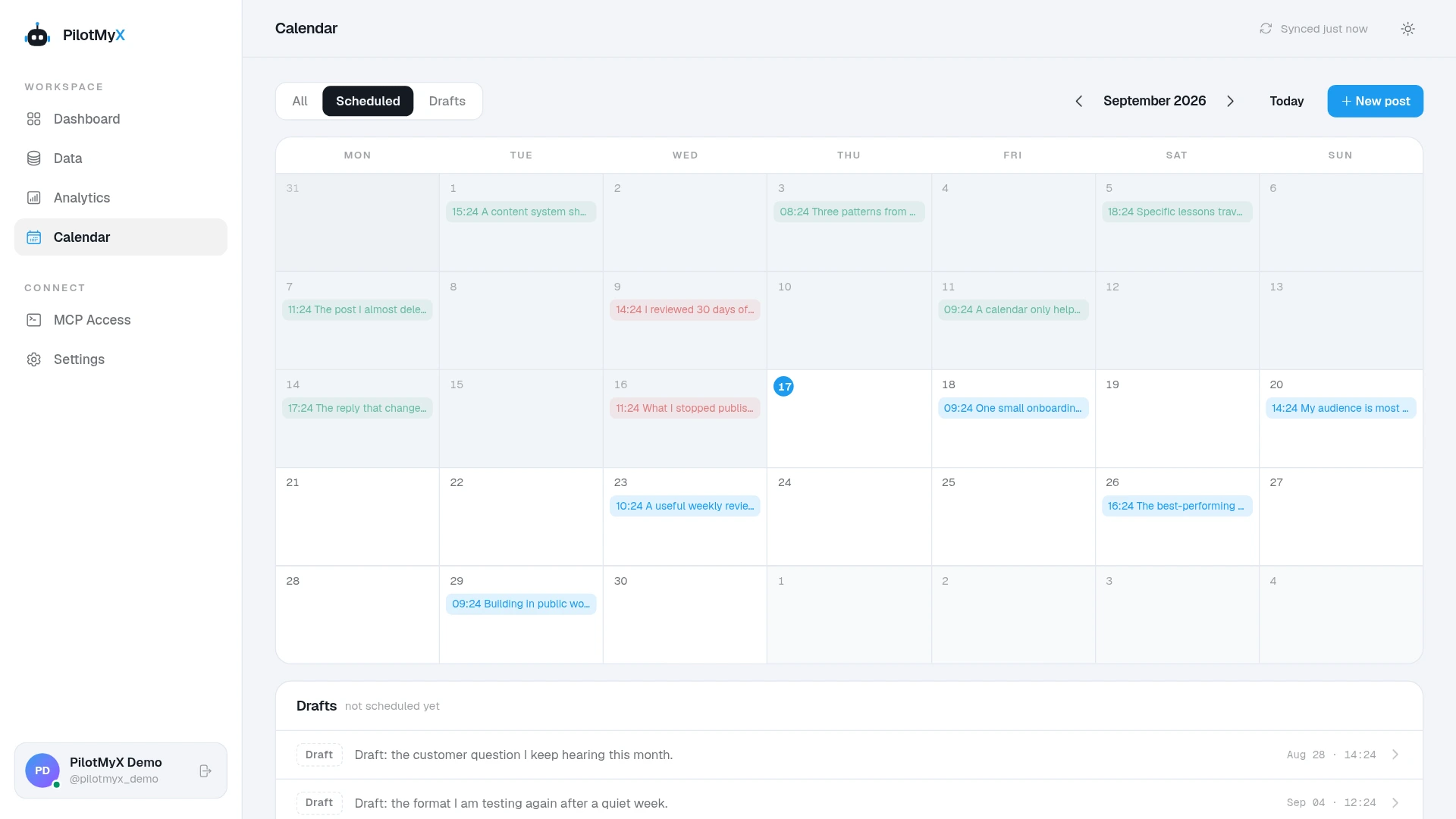
The scheduling guide covers drafts, media, exact times, randomized minutes, rescheduling, and cancellation. Keeping analysis and publishing tokens separate gives each agent only the access it needs.
Troubleshooting
The agent cannot finish the setup
Ask it to continue from the fallback instructions included in the universal prompt. It should identify the exact step it cannot perform and guide you through that step for your own client. You do not need a separate Claude- or Codex-specific tutorial.
The server returns 401 or unauthorized
Check that the token is available to the client running your agent and that no leading or trailing whitespace was copied with it. If the secret may have appeared in a log or tracked file, revoke it and create a new one.
The server is connected but the answer is generic
Ask the agent to use PilotMyX, show its sample sizes, and support each observation with examples from your account. A connected server does not help if the agent ignores the evidence it provides.
The data looks old
Ask the agent to inspect the synchronization status before refreshing. PilotMyX reports what is current, what is stale, and when another refresh is available. A refresh should be deliberate, not hidden inside every analysis.
Frequently asked questions
What exactly is an MCP server?
MCP stands for Model Context Protocol. It gives an AI agent a standard way to use data and actions from another service. PilotMyX exposes your authorized X/Twitter analytics, drafts, and calendar through that connection. Your token decides which parts the agent can use.
Does PilotMyX work with any AI agent?
PilotMyX works with any agent that supports remote MCP servers. Claude and Codex are common examples, but the setup is not tied to either one. Copy the universal prompt and let your agent handle the client-specific installation.
Do I need both PilotMyX skills?
The MCP skill is required for reliable PilotMyX workflows. The voice skill is optional, but useful when you want the agent to maintain local notes about how you write and what you care about across conversations.
Can I use PilotMyX without giving an agent publishing access?
Yes. Keep every write permission off and use the agent for account analysis, content planning, and draft suggestions. Add drafting or scheduling access later if the workflow earns your trust.
Where should I keep the MCP token?
Use the secure environment or secret storage supported by your agent. Do not put the token in prompt history, screenshots, public posts, or tracked configuration files. Give each agent its own token so you can revoke one without disconnecting the others.
How do I disconnect an agent?
Revoke its token from MCP Access. The credential stops working without changing your X password or affecting tokens issued to other agents.
Your next useful step is not another generic request for post ideas. Connect your agent, let it work from your account, and ask it to find one decision worth testing.
Use your own account