Find where your paid clicks stop becoming customers
Twitter ads get clicks but no conversions: what to check
The click count keeps rising, but signups do not. Trace the visit from the ad to the completed action before paying for more of the same traffic.
Find the first place the journey breaks
When Twitter ads get clicks but no conversions, check whether people reach the destination, whether they can complete the action, and whether that completion is recorded. Then inspect the match between the ad, the page, and the audience. A higher budget will not repair a signup form or make an unclear offer easier to understand.
Start by writing down what "no conversions" means. Are there no new accounts in your product, no signup events in website analytics, or no conversions attributed to X Ads? Those are different problems.
| What you can observe | Where to investigate first | What would help confirm the cause |
|---|---|---|
| X reports link clicks; the site records few visits | Destination and visit collection | A mobile test of the exact URL, redirects, loading, and analytics |
| Visits arrive; almost nobody starts signup | Ad promise, landing page, and audience fit | The promoted post beside the page's first screen and primary CTA |
| Signup starts appear; completions do not | Form, login, payment, or confirmation flow | A recorded test that reproduces the failed step |
| Product records show signups; analytics does not | Event implementation | A completed test account matched to the intended event |
| Site records show conversions; X Ads does not | X event collection and attribution | Received event details, matching settings, and reporting window |
| Every step works, but very few visits have arrived | Amount of evidence | A predefined review point within the approved test budget |
Use this as an investigation order. A report can locate a gap without proving its cause.
Check which clicks you are paying attention to
Read the exact metric label in Ads Manager. Link clicks, engagements, profile visits, and purchases answer different questions. Keep the campaign, ad group, promoted post, date range, and timezone attached to the numbers.
X records a link click when the click happens. Website measurement needs the visitor to reach the page and trigger collection. X's analytics discrepancy guide identifies loading delays and people leaving after an unintended click as possible reasons the totals diverge. It also says recent conversion reports can change during processing.
A clicks-to-sessions gap alone does not establish bot traffic. Review the destination and counting rules before making that claim. Sessions are not a one-to-one list of ad clicks, and a visitor may return later through another route.
Choose a completed reporting period and state the attribution window. If recent conversions are still processing, record that limitation and set a later review. The X Ads measurement guide covers how to keep these sources and periods consistent.
Test the destination as a new visitor
Open the actual ad destination on your phone, including the campaign parameters. Test the browser inside X as well as a regular browser. A page that works in your logged-in desktop session may still fail for the people you are paying to reach.
Follow the whole path:
- Confirm that the link reaches the intended page through every redirect.
- Check that the first screen loads, explains the offer, and exposes the next action.
- Try the primary button before signing in to anything.
- Complete the form, authentication, and confirmation steps with a test account.
- Check the saved product result and the corresponding measurement events.
Note the device, browser, time, URL, and exact failed step. "The form returns an error after email confirmation" gives you something to fix. "Twitter traffic is bad" does not.
If the flow works but measured visits remain unexpectedly low, inspect page requests, loading failures, redirects, and collection under the site's supported consent choices. Keep campaign labels through the navigation where your measurement setup requires them. The website traffic guide explains link labels and their limits.
Treat a slow page as a hypothesis until a test or real visitor evidence supports it. A single speed score does not tell you why every visitor left.
Separate a failed conversion from missing measurement
First check the product's own record: did the account, order, or qualified lead exist after a successful test? Then follow that action into analytics and X.
X supports browser collection through the X Pixel and server collection through its Conversion API. Its website conversion tracking documentation describes Events Manager and the Recent Activity Log. An "Active" status indicates activity in the past 24 hours; it does not certify that the correct business action was recorded.
Inspect the event you intend to measure, its host, timestamp, and relevant parameters. A page view received successfully tells you little about whether a completed signup fires. Record test activity separately so it cannot become a claimed customer result.
For a signup, define success as the account state you need. If you require email confirmation, a form submission and a confirmed account should be separate steps. For a purchase, a checkout-button click should not stand in for a completed order. These definitions belong to your business and should agree across the reports you compare.
If X receives events but attributes no conversions to the campaign, check the selected event, reporting columns, attribution window, and permitted matching data. X's explanation of conversion attribution describes matching events using available identifiers such as Click ID and cookies. Receiving an event and crediting an ad are separate questions. A direct test visit can validate collection without proving ad attribution.
Compare the ad promise with the first screen
Once the path works, read the promoted post and landing page together. The person who clicked should recognize the offer immediately.
Imagine an ad promising a free planning template. The destination opens on a paid software signup with no visible template. That is a hypothetical example of a message mismatch: the click may reflect interest in the template while the page asks for a different commitment.
Check the promise, price, required effort, and action. If the ad says "see how it works," does the visitor find a demonstration? If it says "start free," are the conditions clear before signup? Can someone understand the value without reading your entire account history?
X's website traffic optimization guide recommends explaining the destination and testing creative formats and calls to action. Use that advice to form one specific test, such as making the offer explicit in the ad while keeping the page and audience stable.
PilotMyX helps you review what your account said before the click. Find the source post by its text or link, then examine similar posts and their available metrics. Compare posts with posts, keep replies distinct, and check when the data was collected.
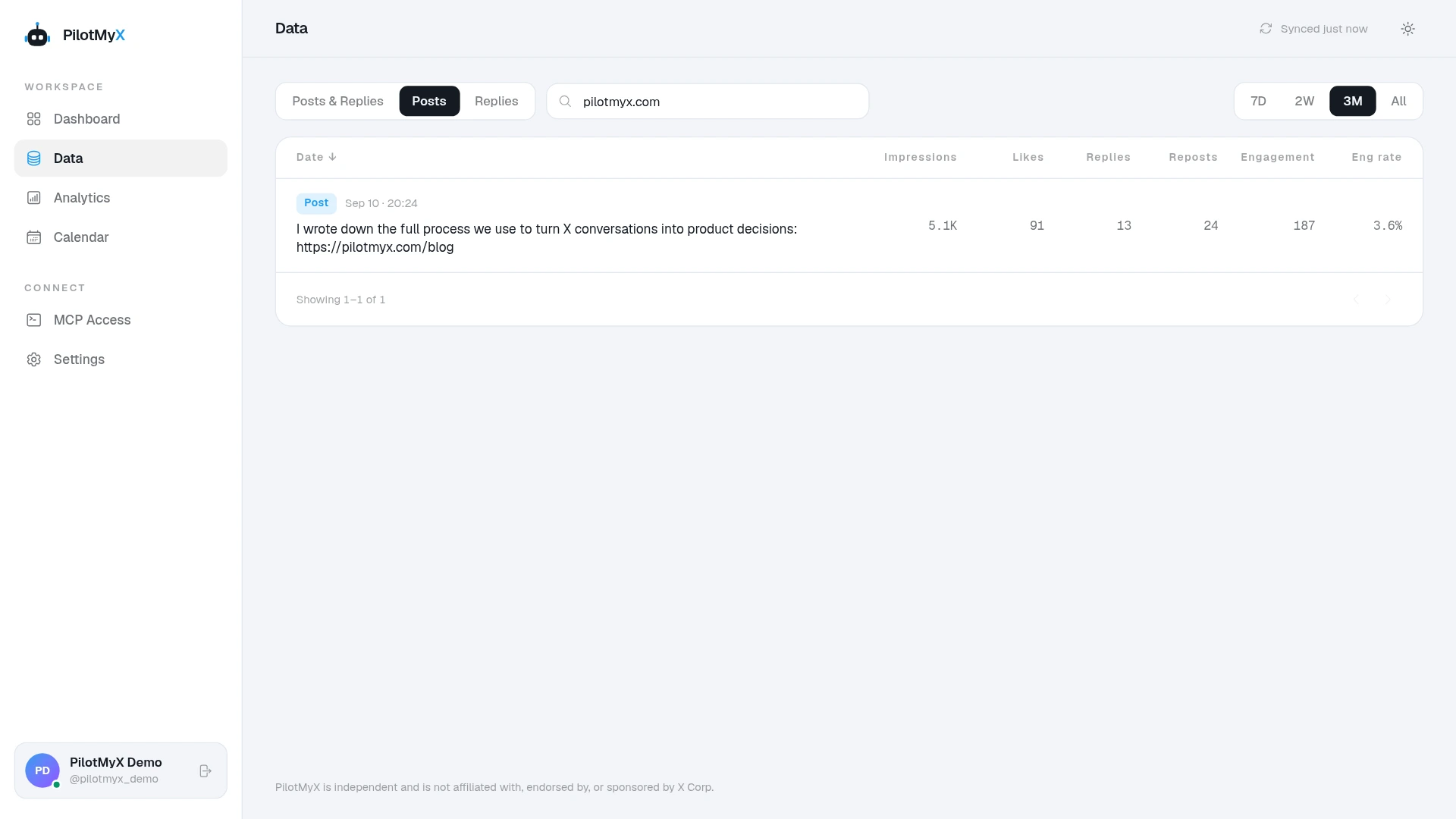
That gives your agent specific language and account context for a revised draft. PilotMyX does not supply the campaign's ad spend or the website's conversions, and a promoted post's account totals should not be assumed to be purely organic. Use the paid report and product events to judge the advertising result.
Check the objective and audience before rewriting everything
Read the saved campaign settings, including the goal and selected event. A campaign evaluated on website traffic and a business trying to acquire paying customers may be judging different outcomes.
X's website sales setup guide documents a Sales objective with a Web conversions goal and a selected conversion event. Verify what is available and configured in your account. Switching objectives without reliable event collection does not establish that the next campaign will convert.
Review the audience against the offer's requirements. Someone can care about the topic and still have no reason to buy. A developer interested in an analytics screenshot may not manage an active X account; a person looking for a free resource may not want a subscription.
Where the reports support it, compare visits and completed actions by device, location, or ad group. Keep the same periods and definitions. Small segments can look dramatically different by chance, so treat an apparent pattern as a candidate for testing until it has enough evidence.
Prioritize a reproducible failure over a broad guess about intent. If the payment step fails on mobile, fix and verify that step. If the journey works and visitors consistently stop before taking any action, test the offer or audience hypothesis with a clear success event. The ad copy guide explains how to vary one message at a time.
Ask your AI agent for the next check
The official X Ads MCP reference lists tools for reading campaign settings, promoted posts, statistics, and web event tags. Those records help the agent locate a problem; they cannot confirm how a form behaves on a phone or what happened in your product database.
Give the agent your test observations and access to the sources needed for this review. Use this prompt after filling the brackets:
Diagnose clicks without [completed signup / purchase / qualified lead] for X Ads campaign [ID], ad groups [IDs], during [start and end timestamps, timezone]. Review only; make no changes.

Business success event: [exact completed action]
Ad destination and tracking labels: [URL, campaign/content labels]
Attribution method and window: [settings]
Authorized website analytics: [source]
Authorized product result source: [source]
Manual test observations: [device, browser, time, steps, outcome]

Read the saved objective, selected event, delivery, link clicks, promoted posts, available conversion metrics, and event configuration through the official X Ads MCP. State source, scope, period, and freshness. Mark unavailable evidence as missing.

Use aggregated website and product data to check arrival, action started, action completed, and attributed result. Keep these counts separate when their definitions or windows differ. Identify whether zero is observed, missing, or still provisional.

Use PilotMyX to find the source post and comparable account content. State data_as_of and available metrics. Do not refresh without explicit authorization. Do not treat post totals as paid conversions or assume they exclude promotion.

Return the earliest gap supported by evidence. For that gap, give the observation, plausible causes, one next check, the result that would confirm or weaken each cause, and what remains unknown. Compare the ad promise with the destination before proposing copy changes. Do not label traffic as bots from a clicks-to-sessions difference alone.

If the evidence is too limited, state what to collect and when to review within the existing approved budget. Do not increase spend, alter campaigns or tracking, publish, or schedule anything.
The useful result is specific: which step to investigate, what evidence to collect, and what would change your conclusion. "Improve targeting and optimize the landing page" leaves you with the same uncertainty you started with.
Choose one fix you can verify
Save the original observation before changing the page or campaign. After the fix, repeat the failed path and review the same completed business action under comparable conditions. Keep a note of what changed and when.
If the question becomes whether to pause, wait, or increase spend, use the budget decision guide. The answer depends on your evidence and approved limits; this diagnostic has no universal click count that turns a campaign into a failure.
Start by finding the promoted post in PilotMyX and opening its destination beside it. Give your agent that context, the campaign report, and the completed-action count. You should leave the review knowing which part of the journey needs attention and how to check whether the next change helped.
Use your own account