Find better X/Twitter conversations
How to find Twitter conversations worth replying to
If you open Twitter to talk to the people you want to reach and end up scrolling, start with a specific question and use search to find the conversation around it.
Your feed is busy. The conversation you came for is still missing.
You open Twitter to talk with people who might care about your work. After fifteen minutes, you've read a launch announcement, two arguments, and a post from someone you already know. You still haven't found a question you can answer.
Start with the problem your audience is talking about, not a list of popular accounts. Search for that problem, read the conversation, and reply only when you can add a useful detail. Keep the links to the conversations you join so you can later see where your time went.
This guide is about finding new conversations. If you need a steady feed from people you already know, Twitter Lists are a better starting point. If you're trying to locate something you wrote months ago, use the old-post search guide.
Search for the question people ask, not your product category
Suppose you build an onboarding tool. Searching for onboarding software may bring up vendors, announcements, and people selling advice. Someone asking "why do people leave during signup?" is closer to a conversation where your experience could help.
Write down two or three phrases a person might use before they know what kind of tool they need. Try a concrete problem, a decision, and an objection. For this fictional onboarding example, those might be people abandon signup, should we ask for a credit card, and users won't connect an account. These are search starting points, not proven high-volume keywords or ready-made replies.
On X.com, sign in, enter one phrase in search, then open Latest. The Top tab can be useful for seeing a well-established discussion, but Latest is more practical when you're looking for a question you can still join. X documents both result tabs in its search guide. Search results are filtered and ranked; Latest does not promise a complete list of every matching post.
If the first search is noisy, use Advanced search under the results' Search filters or More options. The official advanced-search guide describes fields for exact phrases, excluded words, language, accounts, and dates. On the web, you can combine them without memorizing a string of search operators.
Try this sequence:
- Search one problem phrase. Read the newest results before adding filters.
- If announcements dominate, exclude the repeated sales term rather than excluding all posts with links.
- If you know people who discuss the problem well, filter by one account and read the conversations around its posts. Don't mistake the account's follower count for audience fit.
- If results are stale, narrow the dates. If results are empty, remove one constraint. An empty search is not proof nobody has the problem.
For the onboarding example, an exact search for people abandon signup may be too narrow because customers might say drop off during signup. Try the wording you actually hear. Search is there to surface candidates, not to validate a market by counting matches.
Read the post before deciding to reply
A matching phrase is only the beginning. Open the post and look at what the person is actually asking. Has the author already explained their situation in a follow-up? Has someone else supplied the answer you had in mind? Is the discussion about a context you understand, or are you about to offer generic advice to someone with a different problem?
Before replying, use these checks on the post in front of you:
| Check | Worth your time | Usually skip |
|---|---|---|
| The problem | You can address the details in this post | You only recognize a keyword |
| Your contribution | You have an example, trade-off, correction, or useful question | You can only say "great point" |
| The conversation | The author or readers are discussing the issue | It is mostly promotional replies or an unrelated argument |
| Your reason for joining | You would still reply without a product link | The reply only exists to send traffic to your profile |
You do not need to win the first reply slot. X says conversation replies are not always shown chronologically and may be ranked for relevance and other factors. Some are labeled probable spam. Read its replies and mentions guide before treating speed or volume as a distribution strategy.
Write the answer this conversation needs
Stay with the person's question. If they ask whether requiring a credit card is causing signup drop-off, don't reply with a generic checklist for growing a SaaS. Ask what happens before that step, or share a decision you actually made and what you observed. If you haven't tested the issue yourself, say so rather than borrowing someone else's result.
Avoid copying the same answer under many posts. X's authenticity policy prohibits bulk, duplicative, irrelevant, or unsolicited replies. More replies are not a goal if the extra ones add nothing to the conversations.
After replying, save the post URL in a small note with the problem, your contribution, and why you chose that conversation. A week later, those details will help you judge the selection, not just the popularity of the original author. PilotMyX doesn't import your X search results or know which search led you to a reply; the note supplies that missing context.
Find out whether your reply time helped
Give the replies enough time to collect results, then compare the ones you wrote about relevant problems with the ones you left in broad, high-traffic discussions. Read several ordinary examples, not just your biggest one. Did people respond with useful follow-up questions? Were there profile visits where that metric is available? Did you learn something that became a better original post?
PilotMyX lets you inspect the replies you wrote separately from your original posts. Open the reply view for a complete period and read the text alongside the available impressions, profile clicks, and engagement. This can tell you which contributions earned attention; it cannot tell you that a particular search, reply, or author caused a new follow or sale.
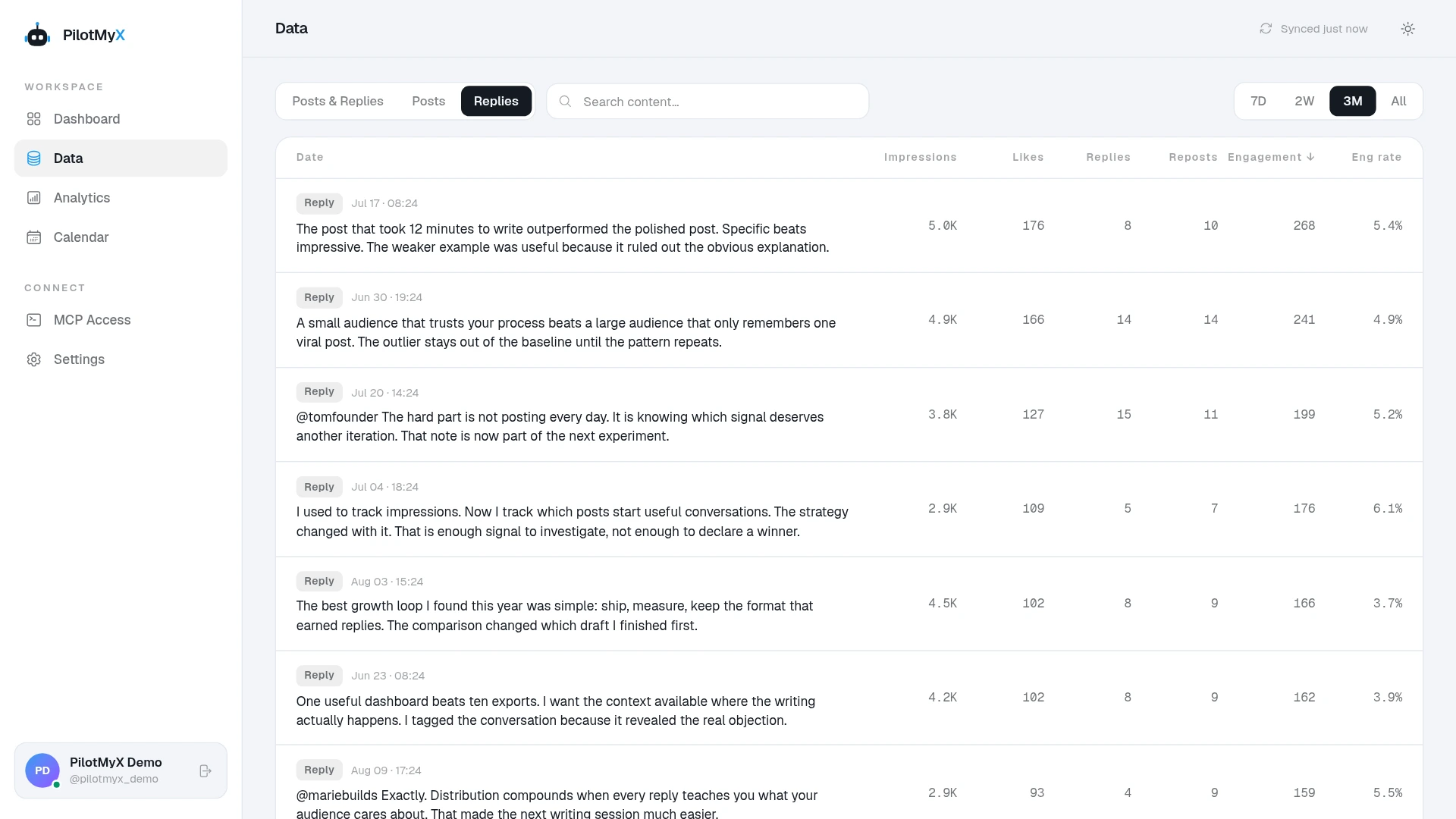
X defines an impression as an appearance on a screen, not a unique person. Its metrics documentation also treats profile clicks as a private metric of your own posts and limits availability of non-public metrics for older posts. If a click count is unavailable, leave it missing rather than reading it as zero. A useful exchange with the right person can matter even when its impression count is modest.
If you use an AI agent connected to PilotMyX, give it the context you saved. It can review your own account history without pretending to have searched every public conversation:
I am looking for X/Twitter conversations about [specific problem]
with [audience]. These are the conversations I chose to join and
why: [post URLs and short notes].

Review my replies from the last 14 complete days available in
PilotMyX. State the date range, how many replies you reviewed,
and which metrics are missing. Read the actual reply text, not
only the highest impression counts. Compare the saved examples
with other replies I wrote during the same period, keeping the
original posts separate.

Show where I contributed a specific answer, where I repeated
generic advice, and which subjects had follow-up noted by me or
available profile clicks. Don't invent the surrounding
conversation if it is not in my notes. Suggest one search phrase
to test next and one question I could answer in an original post.
Ask me for facts you need before drafting. Don't publish anything.
You can do the same review yourself in the app. The reply analytics guide explains what the separate reply view is for, and the agent setup guide covers connecting an agent if you want help with the review.
Make tomorrow's search smaller
Keep the phrases that led you to questions you could answer. Drop the ones that repeatedly led to promotions or unrelated debates. If a few authors consistently start useful discussions, add them to a focused Twitter List. You will no longer need to rediscover those people by search every morning.
The routine can be short: look for one relevant question, read its context, add something only if you can, and record the link. At the next review, use your own replies and notes to decide where to spend the next session. The guide to growing a Twitter account from zero explains how those conversations fit alongside original posts and a clear profile.
Use your own account