Spend less time finding people to talk to
How to use Twitter lists without losing an hour to the feed
You opened Twitter to talk to people in your market and spent an hour scrolling. Build a smaller reading list, then check whether your replies led anywhere.
On this page
Stop looking for the same people every day
You open Twitter to see what people in your market are working on. An hour later, you've read a pricing argument, watched a launch video, and forgotten who you meant to check on.
A Twitter list gives those people a separate feed. Start with one small list built around a reason to read, such as understanding the problems your customers describe. Open it before the home feed.
If one recurring topic is the distraction, the Twitter muted words guide explains how to choose a targeted phrase, set its scope, and avoid hiding useful discussion.
On X/Twitter, a list is a collection of accounts with its own timeline. You can create one or follow someone else's, and adding an account doesn't require following it. Public lists are available for others to follow; private lists are only accessible to their owner.
Create your first list on X
On the web:
- Open Lists from X's navigation.
- Select Create new List.
- Enter a name and description, then choose public or private.
- Select Next, add accounts, and select Done.
To add someone later, open their profile's More menu and choose Add or remove from Lists. You can also pin a list for easier access from your timeline. These controls are covered in X's list instructions.
For your own reading routine, a private list is a sensible starting point. A public list makes more sense when you want to share a useful collection with other people. Give it a name you'd be comfortable having a member read.
Choose accounts by relevance, not follower count
A list called "Interesting people" will probably turn into another general feed. Give it a narrower job: "People building stores" or "Customer questions."
Imagine you're building software for independent shop owners. A famous founder who posts about fundraising might be entertaining, but a shop owner describing a returns problem is closer to the work you need to understand.
Use criteria like these when deciding who belongs:
| What you see in their recent posts | Add them? | Reason |
|---|---|---|
| They describe a problem you understand firsthand | Usually | You can learn from the details and may have something useful to add |
| They work with the people your product serves | Often | Their questions may expose needs you haven't heard directly |
| They have a large following but rarely discuss your area | Probably not | Popularity doesn't make their posts relevant to this list |
| Their posts repeatedly pull you into arguments unrelated to your work | Remove them from this list | You can read them elsewhere if you want to |
Try ten accounts to begin with. That's a manageable starting point, not an ideal size established by research. Add more when you repeatedly notice a missing person, rather than filling the list in one sitting.
Read recent posts before adding an account. A relevant bio doesn't tell you whether their current conversations are useful to you.
Read for a reason, then leave
Choose a short window you can afford, perhaps ten minutes. Look for a concrete question, a decision someone is making, or an experience you can compare with your own.
Before replying, read the original post and the conversation around it. If someone already gave your answer, you may have nothing to add. If you haven't encountered the problem yourself, a precise question can be more useful than borrowed advice.
For example, a shop owner might ask how to handle returns for customized orders. If you've dealt with that, explain the decision you made and what it cost. If you haven't, don't turn their question into an excuse to mention your app.
Keep a short note when something deserves a return visit: the post URL, the question, and what you said you'd check. Leave when your reading window ends. A list is still an endless feed if you treat reaching the bottom as the goal.
A list won't show you every conversation
X's help page says a reply between two list members can appear in the list, while a member's reply to someone outside the list may not. Open the post itself when you need the surrounding discussion.
Adding a protected account also doesn't grant access to its posts; you still need approval to follow it. And a list isn't a group inbox: X provides no feature for its owner to message every member at once. These limits are documented in X's list troubleshooting guide.
Treat the list as a way to find places to read, not a complete record of what everyone has said.
Check whether your replies are worth the time
After you've used the list for a while, read back your replies. You may find that you spent most of the time leaving quick reactions under popular posts, even though you opened the list to learn about customer problems.
In PilotMyX, open Data, select Replies, and choose 2W to review the last two weeks. Read the text alongside the available impressions, profile visits, and other engagement metrics. A reply with broad reach and a reply that starts a useful conversation may deserve different follow-ups.
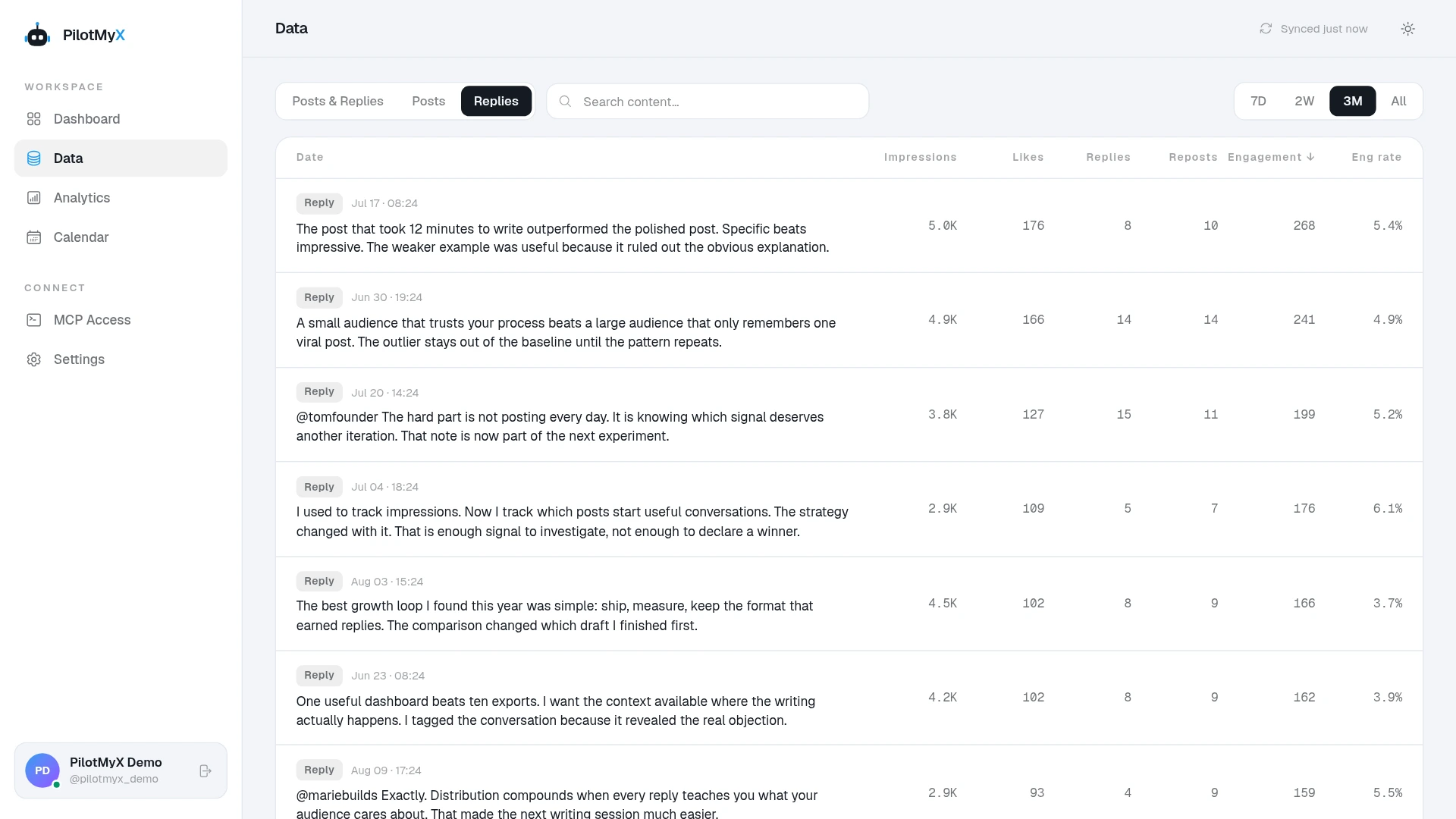
Keep the list itself in X. PilotMyX analyzes the replies written by your connected account; it doesn't import the list's feed or automatically tell you which list led to a reply. Your saved links provide that context.
Don't turn one highly viewed reply into a rule about whom you should talk to. Look at several examples, including replies with ordinary results. Missing metrics should stay missing, rather than being treated as zero. The engagement-rate guide explains how to compare rates without losing sight of the underlying counts.
If you use an AI agent connected to PilotMyX, try this:
Review my Twitter replies from the last 14 complete days in my account's timezone. Use only my replies already available in PilotMyX, and read all result pages needed for that period.

My goal is [the audience or conversations I want to reach]. These are the reply links I saved from my list-reading sessions: [links, if any]. Don't infer list membership for other replies.

Show the dates, sample size, and metric freshness. Compare the replies' text and available impressions, profile visits, and engagement. Keep unavailable metrics separate from zero. Include ordinary results as well as the strongest ones.

Identify subjects where I contributed something specific, with actual examples and links. Separate observations from your interpretation. Don't invent the parent post or surrounding conversation if you can't see it.

Recommend one change to my reading routine and one subject worth an original post. Ask for any missing experience or facts before drafting. Don't refresh data, create drafts, or publish anything.
The agent setup guide covers the connection if you haven't set it up yet.
Turn a useful conversation into your next post
Sometimes the best result is a question you can answer more fully. Save the question in your own words and outline what you can explain from experience. Keep private details out, and don't present another person's result as yours.
Use PilotMyX's reply analytics to examine which of your contributions earned attention, then give your agent the facts for an original post. Review the draft and schedule the version you approve.
At your next review, remove accounts that consistently distract you from the list's purpose. Keep the ones whose conversations you want to return to. Then open that list tomorrow instead of searching for those people again.
Use your own account