Announce your product on X/Twitter
How to write a Twitter product launch post people understand
Months of work can disappear inside a vague launch announcement. Tell the right reader what changed for them, show it, and give them one useful next step.
On this page
You shipped it. A stranger still needs a reason to care.
You've spent months building a product. Your launch post says it's live, lists the features, and asks people to check it out. Someone who has never seen your work still can't tell whether it's for them.
A useful Twitter product launch post names the person it helps, explains what they can do now, shows something they can inspect, and gives them a clear next step. Give a reader enough context to decide whether to try it. A dramatic founder story won't compensate for a missing explanation.
Write the brief before the announcement
Finish this sentence in ordinary language: "Someone who struggles with [specific task] can now [concrete action]." If the answer is "be more productive," keep going until you can describe what they would actually do.
Then check what's available today. Is the product open to everyone, a beta with limited access, or a feature inside an existing paid plan? Does the link open a working tool, a signup page, or a waitlist? Those are different promises.
Keep your evidence beside the brief. A working screen can support a capability claim. It cannot support "saves hours every week" unless you have evidence for that result. Customer quotes need permission and their original meaning; an enthusiastic message from a friend isn't proof of adoption.
Choose the action you want before drafting. For an available tool, that might be trying one task. For a beta, it might be applying with a relevant use case. Asking people to follow, repost, comment, and sign up at once makes the choice harder.
Product launch tweet examples with the claims held fixed
The examples below describe a fictional tool for reviewing design files with clients. They are writing examples, not posts from a real launch or evidence of results.
A first public release
Client feedback gets confusing when every email refers to a different design version. I built a review page that keeps comments beside the file they describe. It's live today. Open the example review to see how it works: [link]
The reader can recognize the problem and inspect the proposed solution. "Open the example review" also tells them what the click will do. Replace it with your actual destination rather than keeping an attractive promise your page doesn't fulfill.
A beta with a specific audience
I need freelance designers to test a client review tool. Upload a design, share the review link, and keep comments attached to that version. It's a beta; I'm looking for feedback on the review flow. Apply here: [link]
This asks for a relevant tester and says what is unfinished. It doesn't invent a limited number of places or a deadline. If access really is constrained, state the actual constraint and keep it current.
A useful update after launch
Clients can now compare the previous design with the new version on the same review page. Here's where to open the comparison before leaving feedback: [link]
The update explains something a reader can do differently. If the opening still feels vague, use the Twitter hooks guide to tighten it without making the claim bigger.
Show the part that proves the promise
If the post promises easier comparison, show the comparison. A full dashboard with tiny labels may look substantial while leaving that action invisible.
Choose a screenshot when one state explains the point. Use a short demonstration when the movement between steps matters. Crop around the useful detail, check it on a phone, and remove private information. The images-versus-text guide helps decide whether an image adds anything.
X's posting guide supports text, links and media, with a standard post length of 280 characters. Treat that as a composing constraint, not a target you must fill or a reason to squeeze every feature into one announcement. Confirm the final text and media in the composer you use.
Put the link where it helps someone take the promised action. A launch post that invites a trial should make the trial easy to find. The link-placement guide covers why hiding a link in the first reply isn't a default requirement.
Prepare follow-ups that answer different questions
Save a useful detail for a post that stands on its own. You could demonstrate one task or answer a setup question someone actually asked. A limitation may also deserve an explanation before people try the product.
Don't turn one announcement into five nearly identical pitches. X's authenticity policy prohibits repeated duplicative posts, irrelevant promotional replies, and coordinated engagement exchanges. A word swap or a waiting period isn't an automatic exemption.
In PilotMyX, review your existing drafts and scheduled posts before adding the launch. Keep unfinished material as drafts; schedule approved originals when the product, destination, and supporting images are ready. Leave room to respond to what people actually ask instead of prewriting a fictional customer reaction.
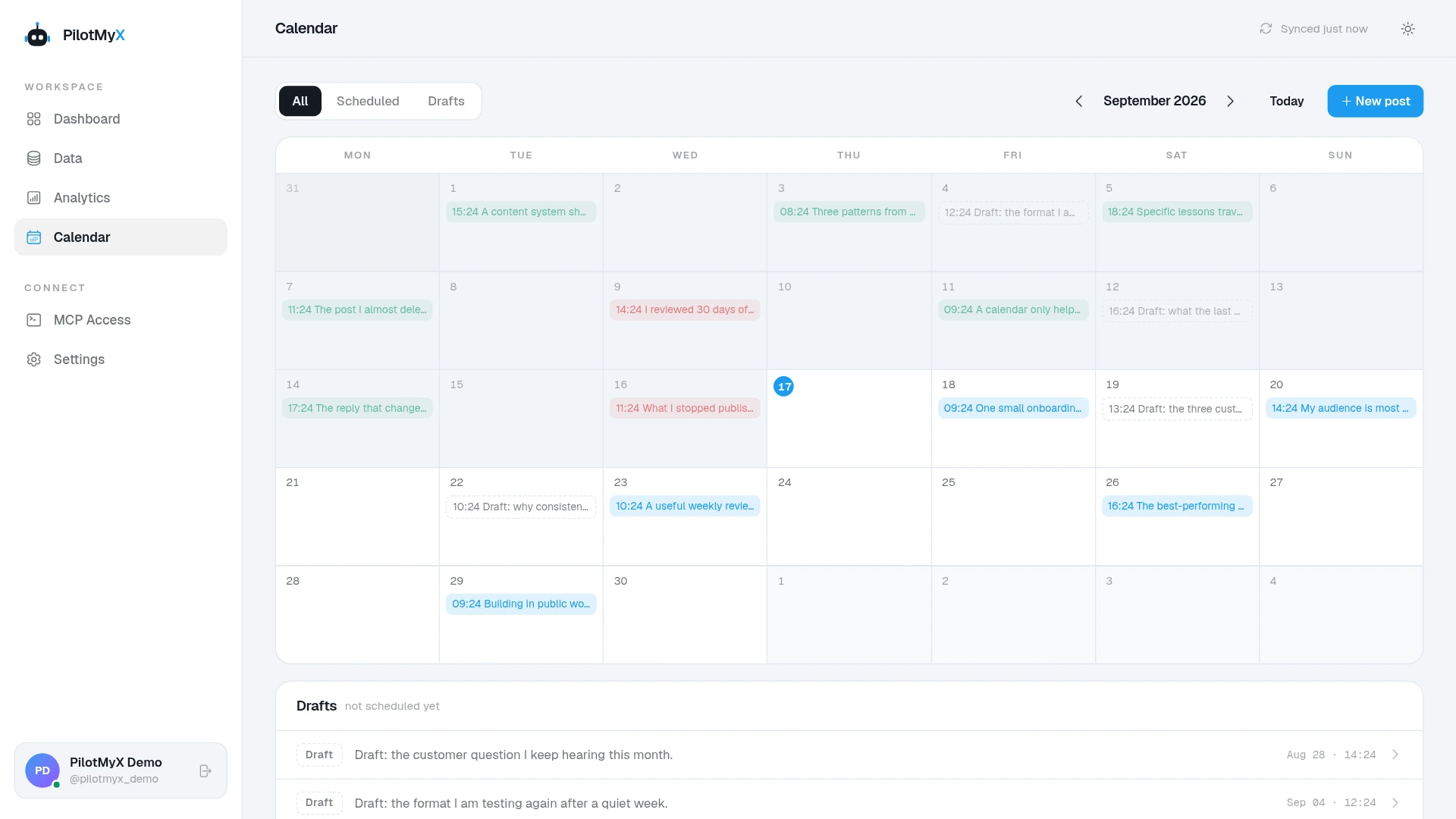
Pick a time when your intended readers may be around and you can handle questions. Treat it as a choice to evaluate, not a universal best launch hour. Use the scheduling guide for the approval and timing steps.
Judge the launch against the action you asked for
Decide what you will check before publication. Otherwise, a large view count can distract you from whether anyone tried the product.
| What you asked readers to do | Evidence to inspect | What it doesn't prove |
|---|---|---|
| Understand the product | Questions and feedback you can read | Likes alone don't establish understanding |
| Visit the example or landing page | Available URL clicks and website sessions | A post impression isn't a visit |
| Apply for the beta | Recorded applications and relevant use cases | A reply saying "nice" isn't an application |
| Try the product | The intended action recorded in your app | Signup alone doesn't establish successful use |
X's metrics documentation distinguishes impressions from URL and profile clicks; impressions aren't unique people. Some private click metrics may be unavailable. Keep an unavailable value separate from zero.
PilotMyX can help you read the post and its collected response. Your website or app supplies the evidence for applications and product use. Keep those sources separate rather than claiming PMX attributes every signup to a post. The website traffic guide explains link tracking and its limits.
Ask your agent to prepare the announcement
After connecting an agent to PilotMyX, give it the launch facts. This prompt proposes copy without creating or scheduling anything:
Help me prepare an original Twitter product launch post.
Intended reader: [specific audience and problem]
Available today: [verified capabilities and access conditions]
Destination: [exact URL and what opens there]
Evidence I can show: [approved screenshot, demo, or facts]
Desired next action: [one action]
Unknown results or private details: [what you must not claim]

Use PilotMyX in read-only mode. Read relevant original posts from
the last 30 complete days in my account timezone for voice and
context. State dates, coverage, freshness and missing metrics.
Read actual examples; don't infer a launch promise from a high
impression count. Check drafts and scheduled items for overlap.

Ask for missing launch facts before drafting. Propose two alternative
announcements and explain what each makes clear to a new reader.
Keep access conditions, claims and link destinations exact. Don't
invent customer reactions, scarcity, results or personal history.

Suggest one distinct follow-up only if I have evidence for it.
Do not refresh data, upload media, create drafts, schedule or publish.
Leave those actions for a separate approval.
Read the draft beside the destination page. If they promise different things, fix that before deciding when to publish.
Frequently asked questions
How long should a Twitter product launch post be?
Long enough to make the offer understandable and the next action clear. A standard post allows 280 characters. Cut background before cutting the detail that tells someone whether the product is for them.
Should I share a launch when I have few followers?
You can publish a clear announcement and give profile visitors something concrete to inspect. Join relevant conversations because you can help, rather than dropping the same pitch into unrelated replies. A small starting audience doesn't establish what reach the announcement will get.
Can I announce the product more than once?
You can discuss different tasks, genuine updates, and actual questions. Review what each post adds and avoid repeated identical or nearly identical promotional copies. There is no universal repost interval established by the cited policy.
Can PilotMyX prepare the launch with my AI agent?
Your agent can use PilotMyX history to help draft in your voice and review the queue. You supply current product facts and approve the exact content. PilotMyX stores drafts and schedules approved posts; the agent does the writing.
Use your own account