Choose the format before making the graphic
Twitter images vs text: when a screenshot earns its place
A screenshot can make a change obvious. It can also make a simple idea harder to read. Decide what the image adds before you spend time making it.
On this page
You don't need a graphic for every good idea
You finish a Twitter post, then spend another half hour turning it into an image because you've heard that photos get more reach. By the time you publish, the graphic repeats the sentence you already wrote.
Choose between an image and text by asking what the reader needs to understand. Attach a screenshot when it shows a visible change, an example, or the evidence behind a claim more clearly than words alone. Keep a simple explanation in text when the image adds only decoration. That is an editorial choice, not a promise about the algorithm.
Decide what someone should notice in the image
Before opening a design tool, finish this sentence: "The reader needs to see..." If your answer is "the same words in a nicer font," reconsider the image.
| What you're trying to explain | A useful starting format | What the image needs to add |
|---|---|---|
| An opinion or a short lesson | Text | An image is optional unless it supplies a concrete example. |
| A change to a product or process | Text with a screenshot | The difference should be visible, not hidden behind tiny labels. |
| A measured change over time | Text with a chart | The metric, period, and comparison must be clear. |
| A physical object or something you made | Text with a photo | The detail you're discussing should be easy to see. |
These are starting points, not fixed rules. A photo can tell a story, and a short sentence can explain a result without a chart. Choose the format that makes this particular post easier to understand.
Here is a fictional writing example. Suppose you moved an unresolved customer question to the top of a support handoff. You could write:
The support handoff included every message but buried the question we still needed to answer. I moved that question to the top so the next person could see where to start.
The text explains the decision. Before-and-after screenshots would earn their place if they made the old and new layouts obvious. A full browser screenshot with unreadable ticket text would add little. Neither version proves that support got faster; you would need evidence for that separate claim.
Make the post work before someone opens the screenshot
State the point in the post text. "Look at this" gives someone very little reason to open an attachment. A sentence naming the visible change tells them what to inspect.
Crop a screenshot to the relevant area and check it at phone size. Keep enough context to interpret it honestly: a chart may need its date range and axis labels; a before-and-after comparison needs both states. Remove unrelated tabs and private information before upload. If you have to zoom in to read the detail your post depends on, make it larger or put it in the text.
X's photo posting guide explains how to attach and reorder images and describes the display of a single photo. Those instructions don't establish that an image will outperform text. Preview your actual attachment rather than assuming the timeline will make a dense desktop screen readable.
Add an image description too. X's description guidance recommends preserving important information and summarizing text in an image. Our Twitter alt text guide covers screenshots and charts in more detail.
Compare posts that had a similar job
Your biggest screenshot post may also have announced your biggest launch. Comparing it with a quiet text update cannot tell you whether the image caused the difference.
Start with several original posts about a similar subject, aimed at a similar audience. Keep replies and quotes separate. Identify posts with photos, posts with no attached media, and those with other media or uncertain attachment data. Don't quietly put an unknown attachment into the text-only group.
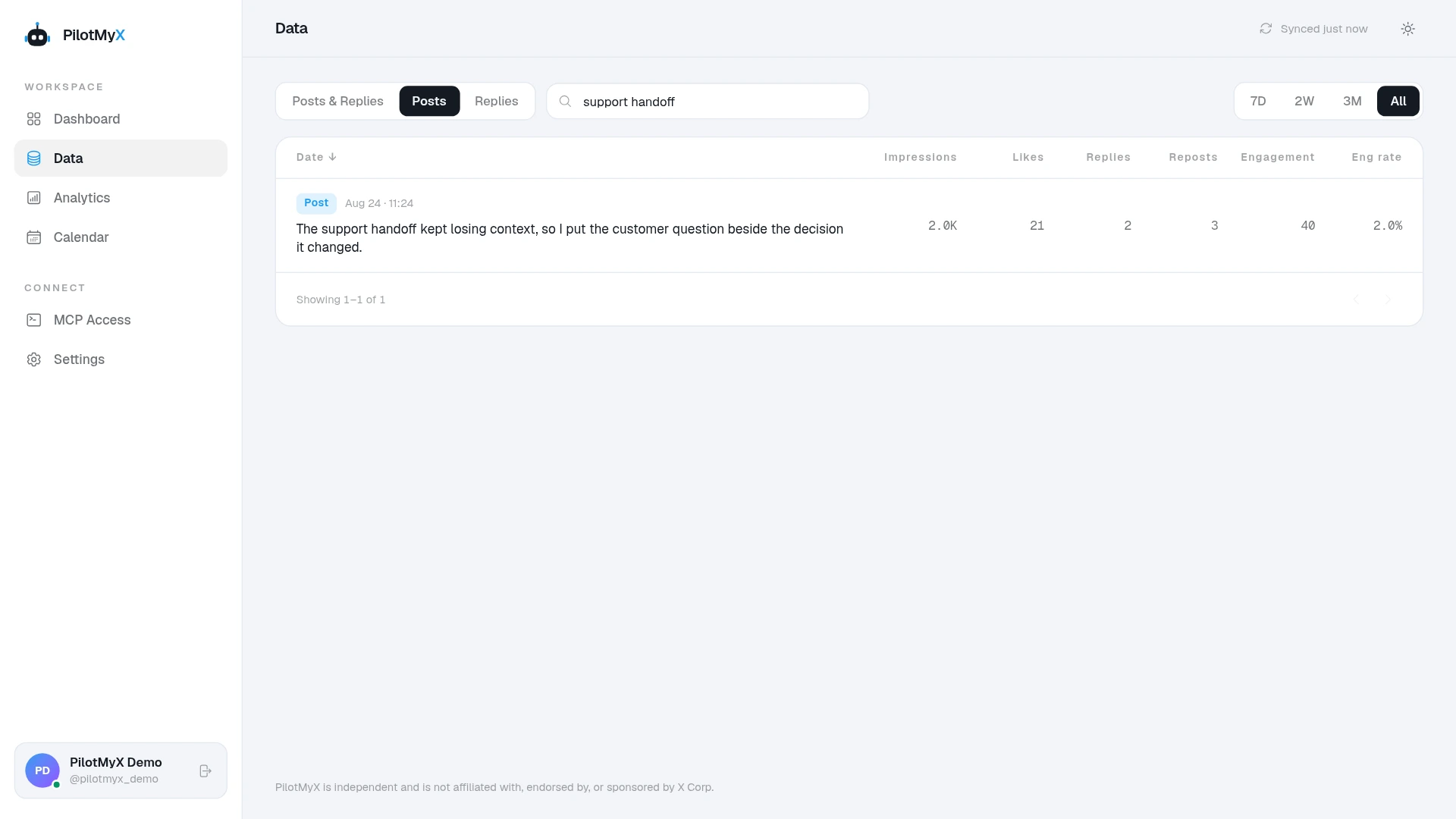
In PilotMyX, search the Data page for a relevant topic and read the posts beside their results. This screenshot shows a search for "support handoff." It gives you a starting example to inspect, not an automatic images-versus-text report.
Use the outcome you wanted, not whichever counter looks largest. For discovery, examine impressions. For interest in your account, examine available profile visits alongside impressions. For a resource meant to send people to your site, examine available URL clicks. Read replies when you want to understand whether people understood the example.
X's metrics documentation says impressions count displays, not unique people. Public counts can include paid promotion, and private click metrics have an availability window. A missing counter is not zero. Nor does a post impression show that someone opened or understood its photo.
Record the date range, sample sizes, and when metrics were captured. Review posts at comparable ages; the guide to judging a Twitter post explains that timing problem. If you cannot separate promoted posts, different topics, or unequal measurement ages, say what the comparison cannot establish.
Look at typical results and the spread, then read the standout separately. A few posts can suggest a test without settling which format works better for your account. Include the time it took to make the images in your decision. If a graphic takes an afternoon and adds no explanation or evidence, keep that time for the next idea.
Ask your agent to review the choice before drafting
An agent connected to PilotMyX can read the media information returned with your posts and group the examples it can identify. The agent does the analysis; PilotMyX supplies your stored history and metrics.
After connecting your agent, try:
Help me decide whether my next original Twitter post needs an image.
Use PilotMyX in read-only mode. Do not refresh, create drafts, publish, or schedule.

Ask for the idea, intended audience, and outcome if I haven't given them.
Review available original posts from the last 30 days about related subjects.
State the dates, timezone, sample sizes, metric freshness, and missing data.
Read each post's wording and returned media information. Keep photos, text-only
posts, other media, and uncertain attachments separate; exclude replies and quotes.
Flag paid promotion or measurement-age differences that prevent a fair comparison.

Use the available metrics relevant to my goal. Show representative IDs or URLs,
typical results, and any standout that changes the conclusion. Don't claim the
format caused a result or that a photo view is a unique reader.

Recommend text alone or an image with a specific purpose. If you recommend an
image, say what the reader needs to see and what verified asset I need to supply.
Don't invent a screenshot, customer result, personal experience, or number.
Suggest a self-contained draft in my voice for review. Leave all writes for approval.
Once you choose the post, attach the approved images to its PilotMyX draft, check their order and alt text, and review the exact wording before scheduling. The scheduling guide covers the publication time and final approval.
FAQ
Do tweets with images perform better than text-only tweets?
There isn't a universal winner established by the sources used here. Images can help explain a visual subject, but account, audience, topic, and measurement differences affect the comparison. Use relevant examples from your own history to choose a test.
Should I turn every tweet into a text image?
No. If the image only repeats the post, it adds production time and makes readers depend on its legibility. Use it when the layout or visual example contributes something useful, and keep the main point in the post text.
Can I use a screenshot as proof of a result?
Only for what it actually shows. A chart needs the metric and period; a before-and-after screen shows a design change, not a conversion improvement. Don't remove context that changes the meaning of the claim.
Can PilotMyX schedule posts with images?
Yes. Add approved images to your draft, review their order and alt text, then approve the post and its publication time. You can do that in the app or through a connected agent with the appropriate permissions.
Use your own account