Give the post time to show you something
When should you judge a Twitter post's performance?
A post from this morning and one from last week have not had the same chance to collect views or clicks. Set useful review points before you decide what to repeat.
On this page
A post from this morning has not had the same chance as last week's post
You publish a post, check it a few hours later, and put its view count beside an older post. The new one looks disappointing. Before you rewrite your calendar around that result, check the age of both posts.
There is no universal hour when a Twitter post is “done.” Use the first day to catch problems you can fix, then review the result again after the post has had more time. If you compare posts, either record their metrics at the same age or state plainly that you are looking at current lifetime totals. Do not call a young post a failure because it has had less time to collect activity.
X says a post's view count is not a count of unique people: the same person can add more than one view. Its Post Activity Dashboard also warns that reporting can take up to 36 hours to stabilize. That is a reporting caveat, not a promise that distribution stops at 36 hours.
Start with the job the post had
A post introducing your work, a product demonstration, and a link to a signup page ask readers to do different things. Choose the signal that fits the post before looking for a winner.
| If the post was meant to... | Look for... | Be careful about... |
|---|---|---|
| Get your idea seen | Impressions and relevant replies | Views are not unique people or proof of interest |
| Bring people to your profile | Available profile clicks, then the profile they find | A click is not a follow |
| Send people to a page | Available URL clicks and your website's visits or signups | A click on X is not a completed website session |
X's metrics reference separates public impressions from private URL and profile clicks on owned posts. The private fields may be unavailable for some older content; an unavailable value is not zero. If you want to calculate an engagement rate, the engagement-rate guide covers the denominator and its limits.
Make the first check, then leave a later review point
Soon after publishing, read the post as a stranger would. Is the link correct? Does the image show what the text promises? Is a claim wrong or out of date? Fix a factual or safety problem as soon as you find it. You do not need a performance verdict to do that.
For an ordinary content review, a next-day check is a useful convention. Record the post's age, the metric you care about, and when the data last synced. Revisit it later, for example after a week, if the result could change the next post you make. Those are your review appointments, not X's deadlines for success.
Here is a fictional comparison with manually recorded snapshots:
| Post | At six hours | At 24 hours | Later lifetime total |
|---|---|---|---|
| Product screenshot | 280 impressions | 640 impressions | Not yet recorded |
| Launch lesson | Not recorded | 500 impressions | 900 impressions after seven days |
At six hours, the screenshot trails the launch lesson's seven-day total. At 24 hours, the recorded snapshots tell a different story. Neither comparison proves which idea will work next time. The example illustrates why you should keep the observation age with the number. PilotMyX does not manufacture missing 24-hour snapshots from a post's current total.
What PilotMyX's “too recent” count means
In PilotMyX Analytics, the timing view excludes posts less than 24 hours old and shows how many were left out. This prevents a post published minutes ago from entering a heatmap alongside older content that has had more time to collect activity.
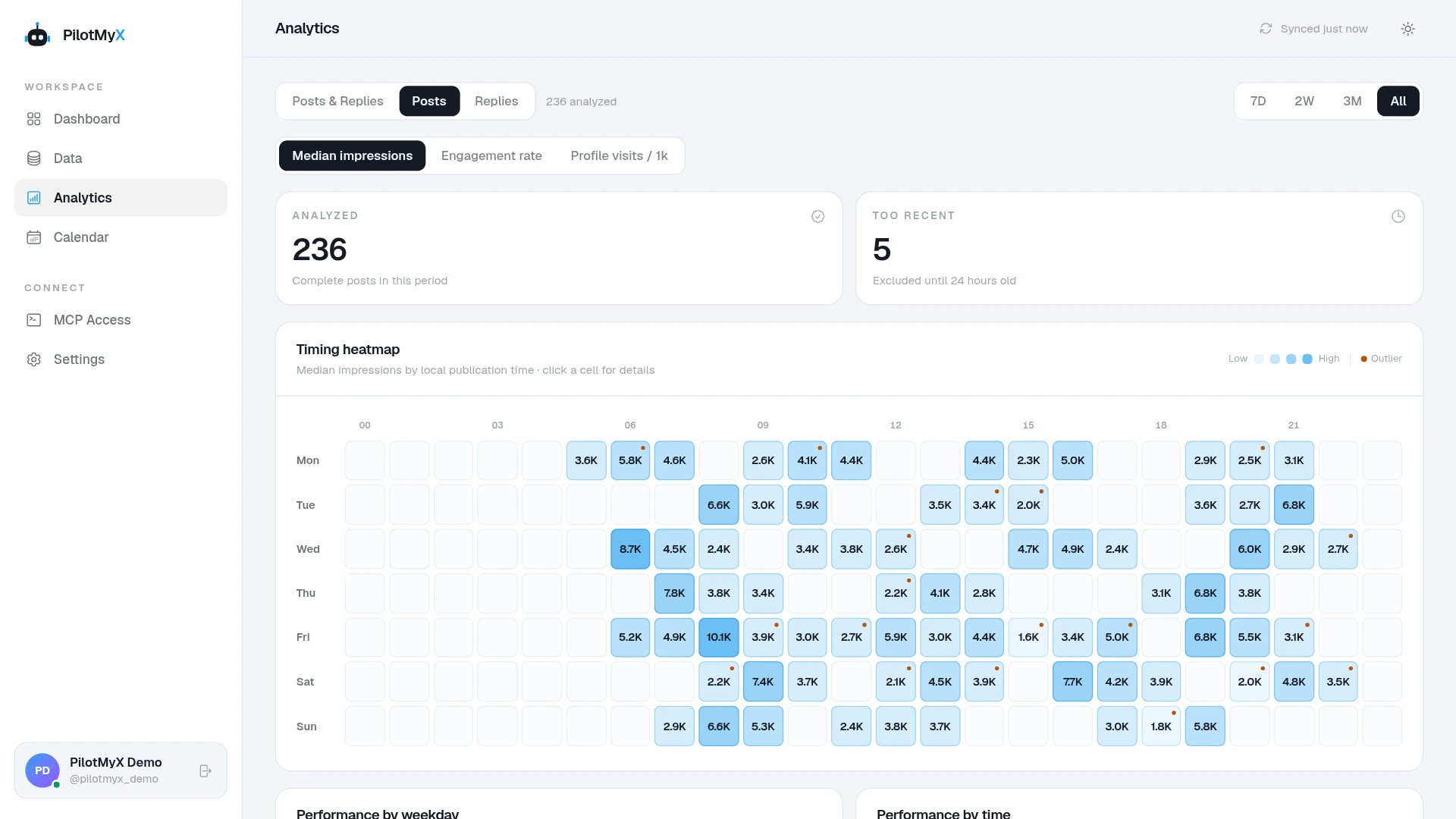
The 24-hour threshold belongs to that timing analysis. It does not make a 25-hour-old post equivalent to a seven-day-old one, and it does not say that posting in the darkest or brightest cell caused a result. Read the sample count and the analytics methodology before turning a color into a schedule rule.
The Data view is useful for reading the actual posts behind the numbers. Filter original posts separately from replies, choose a defined publication window, and check the synchronization time. PilotMyX shows the latest available metrics for posts published in that window. Those are lifetime totals as last synchronized, not a record of activity confined to the selected dates. X makes a similar distinction between its post list and account summary.
Choose the next test from comparable work
Once the newer post has a meaningful review point, put it beside posts with a similar purpose. Look at the actual wording and audience, not just the highest row. A launch announcement and a practical answer may earn different kinds of attention. Keep a one-off spike visible, but do not let it set the target for every ordinary post.
If you have only a few comparable posts, write down what you noticed and test again. “This opening brought more profile clicks in two examples” is a tentative observation. “X prefers this opening” is a claim about the platform that the data cannot support.
An agent connected to PilotMyX can help make that review concrete. The prompt below asks for evidence before a draft and leaves publication under your control:
Review my original Twitter posts from the last 14 complete days.
Keep replies in a separate group. Show each post's URL, publication
date, current age, available impressions, profile clicks and URL
clicks, and the most recent metric synchronization time.

I want to know whether [post URL] gives me an idea worth retesting.
Compare it with original posts that had a similar purpose. Do not
pretend current lifetime totals are equal-age snapshots. If I have
recorded snapshots at the same post age, use them and say which ones
are missing. Treat unavailable private metrics as unavailable, not zero.

Read the actual posts, give me one observation and one alternative
explanation, then suggest one change for the next post. Draft it in
my account's voice using only claims I can verify. Do not schedule
or publish until I approve the text and time.
If the next idea is worth trying, place the approved post in the PilotMyX calendar. Review it at the same checkpoints you chose for the first one. You will have a comparison you can learn from even while the older post's totals continue to change.
Use your own account