Find out whether the explanation got through
Twitter video views: did people watch what you wanted to show?
A large view count doesn't tell you whether people saw the point of your video. Check what the number measures before spending another afternoon on the edit.
On this page
The counter went up. Your explanation may still have gone unseen.
You spend an afternoon editing a Twitter video. Its view count rises, but nobody asks about the thing you demonstrated. Before making the next video longer or more polished, check whether that counter measures views of the post or playback of the video.
They answer different questions. A post view doesn't establish that someone watched the clip. A video view doesn't establish that they reached your example, understood it, or decided to follow you. To improve the next one, connect the available viewing data to the moment where your explanation becomes useful.
Twitter post views and video views are different counters
X's public view-count explanation describes how often a post was seen by logged-in users. The author's own views count, and repeat views can count too. That number is not a count of unique people or completed video plays.
The definition for the main video-view metric in X Media Studio requires at least two seconds of watching with at least half the player visible. X says this report covers logged-in viewing and excludes logged-out viewing and web embeds. Attribute that definition to Media Studio; don't apply it to every number labeled "views."
Before comparing two reports, write down the label, source, date range, and whether the number belongs to a post or a video. A screenshot with the label cropped off can make two different measures look like a discrepancy.
X's API metrics documentation separates post impressions from video-media views and playback milestones. It also says video views aggregate across posts containing that video. Reusing a clip can therefore leave you with a video total that you cannot attribute to one post. Don't divide that total by one post's impressions and call the result the percentage of readers who watched.
Look for the moment people needed to reach
Decide what the clip was supposed to do. If you're showing a drawing technique, the useful moment might be the brush movement that changes the result. If you're demonstrating a workflow, it might be the first visible before-and-after. Knowing where that moment sits gives you a reason to inspect playback rather than just celebrate the total.
For accounts with Media Studio access, X documents average watch time, completion rate, and retention milestones in its analytics. Keep the video's length beside those measures. Use an available retention report to inspect how far viewing continued; don't invent one from impressions or likes.
Consider a fictional comparison: a 20-second clip and a 90-second clip both have an average watch time of 12 seconds. That is 60% of the first clip's duration and about 13% of the second's. These are arithmetic comparisons, not completion rates. They don't tell you how many people watched either clip to the end.
Watch the clips yourself too. If the demonstration begins after 25 seconds of introductions, the aggregate counter alone cannot show whether viewers reached it. A sensible next test is to move the demonstration earlier while keeping the subject recognizable, then review the new result on your account.
Choose an edit that matches the evidence
Use these as starting hypotheses, not diagnoses delivered by a counter.
| What you can observe | What to inspect | One possible next test |
|---|---|---|
| Few post impressions | The subject and wording around the clip | Name the specific problem in the post instead of writing "new video." |
| Viewing drops before the demonstration, in an available retention report | How long the setup takes | Show the result first, then explain the steps. |
| People reach the example but ask what happened | Whether the key action is visible at phone size | Enlarge the relevant detail or slow down that action. |
| Viewing continues but the desired next action stays low | Whether the post and clip give a reason to take that action | Make the relevant resource or account promise clearer. |
Don't shorten every video because one long clip disappointed you. A detailed tutorial and a quick reveal have different jobs. Compare several clips with similar subjects and lengths, and read the surrounding post text. The guide to judging a Twitter post explains why equal measurement ages matter.
Keep paid distribution separate where the report allows it. Media Studio distinguishes organic and promoted viewing. If those are mixed, say so rather than treating the total as an organic result.
Review the post's response as well as the video
Watching is only part of the result. If you wanted people to understand a technique, read their questions. If you wanted interest in your work, inspect available profile clicks. If you linked to a resource, inspect available URL clicks and website results. Choose the outcome before ranking the clips.
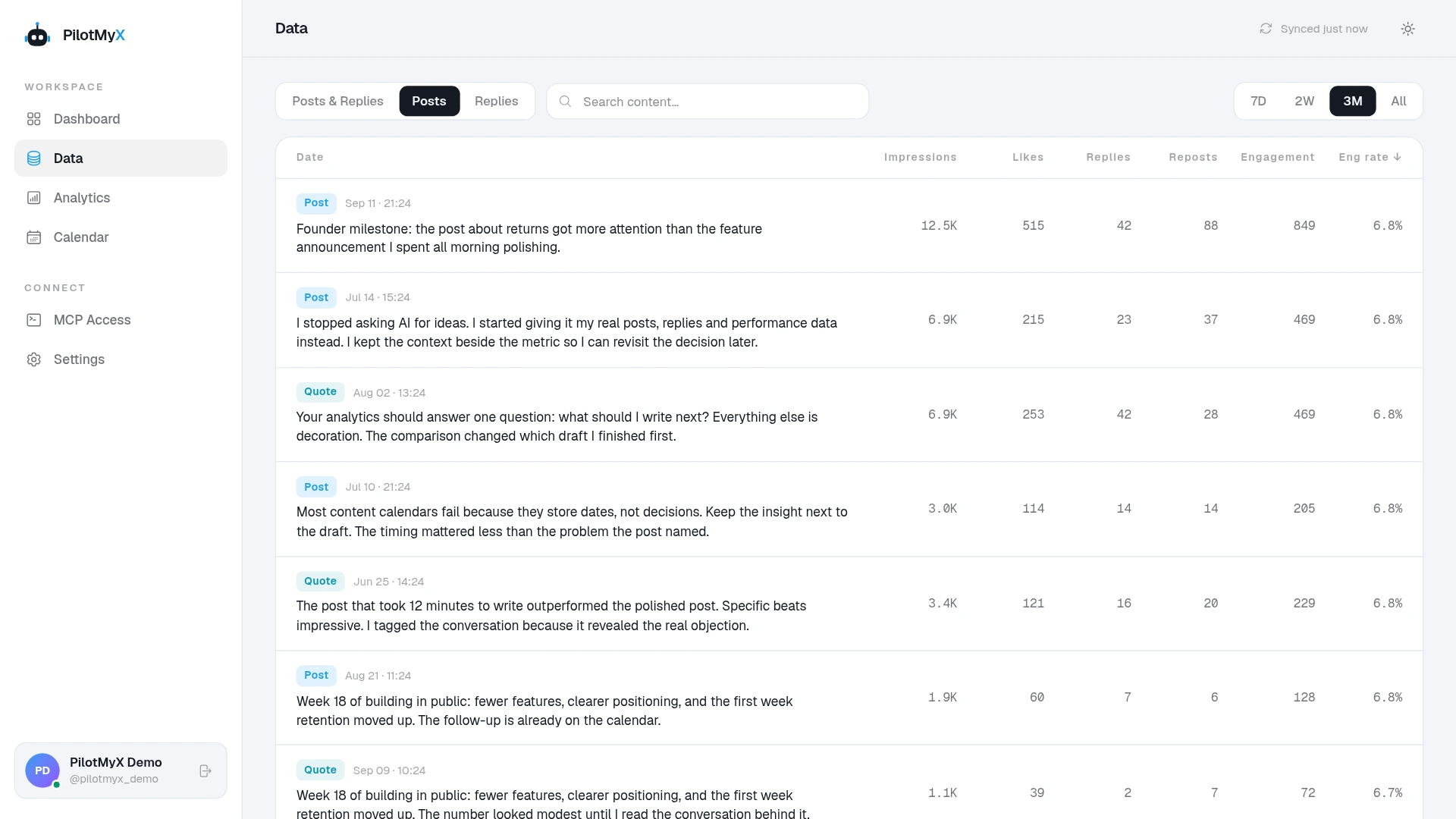
PilotMyX keeps collected post text and available metrics together. In the Data page, read the wording beside impressions and responses. That can help you spot whether a post explained why someone should watch, or whether a larger result came from a different subject altogether.
Your connected agent can inspect returned media information and available media-view counts. Missing counts remain unknown. PilotMyX's current MCP contract doesn't provide average watch time or playback quartiles, so bring those from a report you can access if the decision needs them. Keep their source and scope attached; don't silently substitute them for a different counter.
Ask your agent for one useful next test
After connecting your agent to PilotMyX, use a prompt like this:
Help me decide what to improve in my next Twitter video post.
My audience: [intended reader]
What the video should help them do: [specific task or next action]

Use PilotMyX in read-only mode. Review original posts from the last
30 complete days in the account timezone. State dates, coverage,
sample size, metric capture times, and freshness. Keep replies and
quotes separate. Identify video attachments from returned media;
keep uncertain attachment types separate.

Show the exact post text, IDs, impressions and available responses
for comparable examples. Label media-view counts separately when
present. Do not treat missing values as zero, assume unique viewers,
or manufacture watch time or retention from engagement metrics.

Ask me for the clip length, where its useful demonstration begins,
and any viewing report needed. Preserve that report's source,
date range, video-versus-post scope, and paid/organic split.
Don't calculate a viewing rate from mismatched scopes.

Read the evidence against my goal. Suggest one concrete change
to test and explain what evidence would help evaluate it.
Do not claim that a counter proves understanding, follows or sales.
Do not refresh, upload, create drafts, schedule or publish anything.
Bring the actual clip and your process to the next draft. An agent cannot know which detail was unreadable or which explanation was missing from a metric alone. If a still image would communicate the point more clearly, use the images-versus-text guide to reconsider the format before another edit.
Frequently asked questions
Does a Twitter post view mean someone watched my video?
No. The public post counter measures viewing of the post. You need a video-specific measure to assess playback, and additional evidence to assess whether the explanation got through.
Are Twitter video views unique viewers?
Don't assume they are. Identify the report and its definition before describing a view total as people. Post views explicitly can include repeat viewing; video-media totals also have a different scope from one post.
What is a good Twitter video completion rate?
There is no universal target established by these sources. Compare clips with a similar purpose and duration, keep the sample size visible, and evaluate whether the part that mattered was reached.
Can PilotMyX show me a video retention curve?
Not through its current MCP contract. It provides collected post data and available counters. Use a viewing report for retention, then let your agent compare that evidence with the post's wording and response.
Use your own account