Make your profile easier to understand
What to pin on Twitter so visitors understand your work
Your most-liked post might tell a new visitor nothing about what you do. Choose something that explains your work and gives the right person a reason to stay.
On this page
Pin something a stranger can understand
Pin a Twitter post that tells a new visitor what you do and gives them a useful next step. A product demo, a specific explanation of your work, or a helpful guide can do that. Your most-liked joke or an old launch announcement may not.
Imagine someone reaches your profile after reading a reply you wrote. They liked the reply, but they don't know your product, your past projects, or why you keep mentioning a particular problem. A pinned post should make sense without that history.
X puts an account's pinned post ahead of its other posts for profile visitors, as described in X's profile customization help. You choose it from your profile using the post menu. That placement gives you control over the introduction; it is not evidence of a For You ranking boost.
Choose what the visitor should do next
Decide who the post is for before opening your analytics. A founder looking for early customers needs a different introduction from a developer looking for freelance work.
| Your current goal | A useful post to pin | What it needs to show |
|---|---|---|
| Help people try your product | A short demo of one problem being solved | Who has the problem, what happens in the demo, and where to try it |
| Get relevant work inquiries | A concrete project or walkthrough | Your role in the work and the kind of help someone can ask you for |
| Give people a reason to follow | A useful explanation of a subject you cover regularly | Enough substance to help now, plus what readers can expect from future posts |
| Send readers to a resource | An excerpt or worked example | What they will find after the click and who it is useful for |
Pick the goal that matters now. Asking someone to follow, subscribe, book a call, try an app, and join a community in the same introduction makes them do the prioritizing for you.
A new account can use a modest, specific introduction. You do not need a revenue milestone or a customer quote to explain what you are building. Show work you can actually demonstrate.
Read candidates before ranking their numbers
Look through posts that still describe your work accurately. In PilotMyX, use your published-post history to find explanations, demos, and answers that stand on their own. Start with a recent period such as the last 30 days, and look further back if the strongest introduction is older.
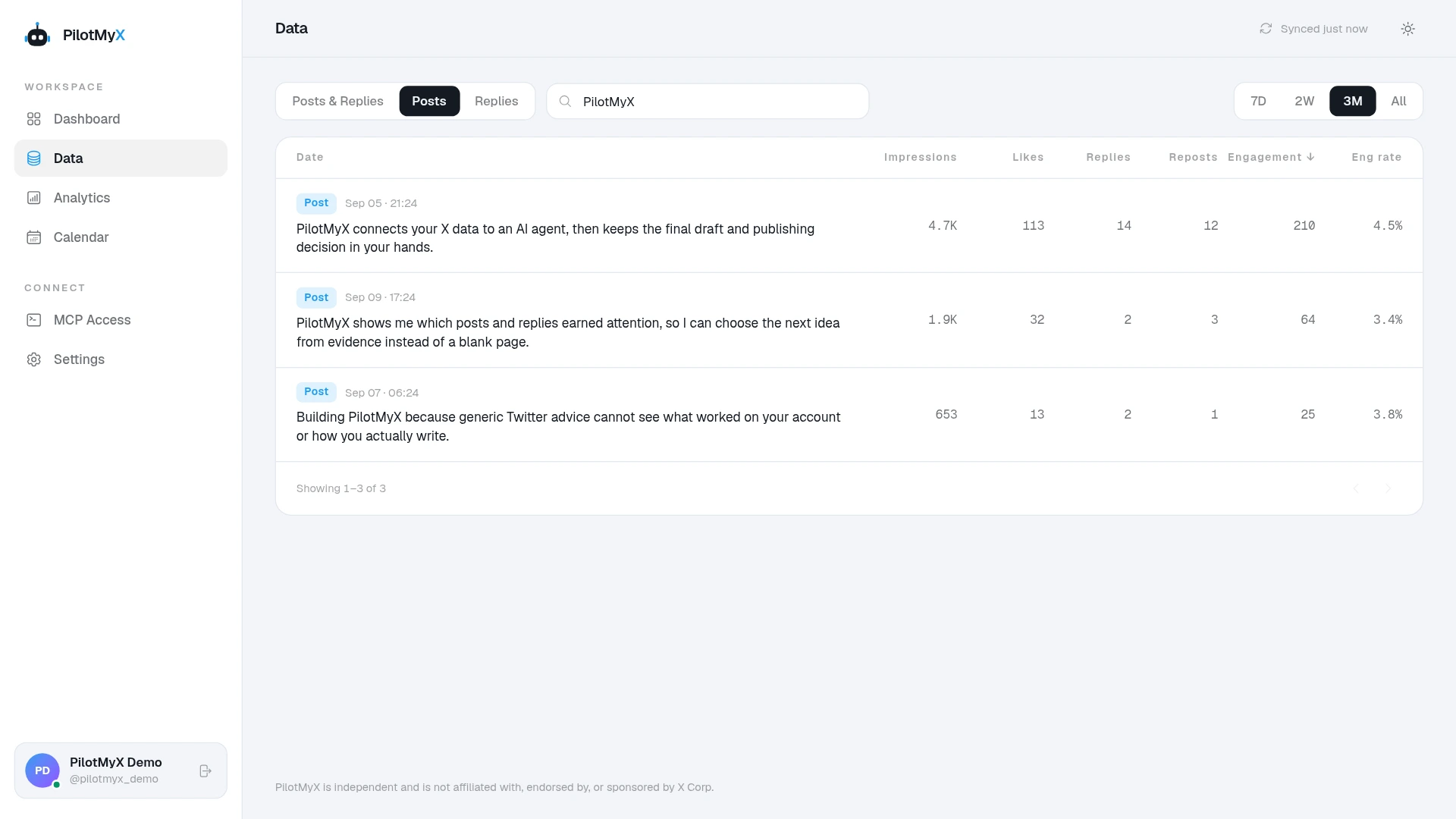
Read each candidate as if you had never seen the account. Does it explain the problem? Can you understand the screenshot without opening several earlier posts? Does the link lead somewhere that delivers what the text promises?
Then look at the available metrics. Profile clicks can help identify posts that made readers curious about the author. URL clicks can be relevant when the goal is to visit a linked page. Likes alone cannot tell you whether the post explains your offer well.
X documents impressions, profile clicks, and URL clicks separately. It also limits access to non-public metrics for posts older than 30 days. Treat an unavailable click count as missing, not zero, and don't expect every older candidate to have the same evidence. See X's metrics documentation.
Keep post age and context in view. An older post has had longer to accumulate activity, and a launch may have received attention from places your usual posts do not. Use the numbers to investigate candidates, not to award the pin automatically.
Show the work in your introduction
Consider a fictional founder building an app for freelance designers to collect client feedback. This is an invented copy example, not a PilotMyX customer story.
An announcement written for existing followers might say:
Finally shipped the thing I've been working on. So excited about this launch. Let me know what you think!
That reader has to visit another page just to find out what the product does. A more useful introduction could say:
Client feedback spread across email and chat? I built a review page that keeps comments next to the design. This demo shows how a client leaves feedback without an account. Try it on your next project: [product link]
This version assumes the product really supports that workflow and the post includes the demo described. Replace those details with facts about your own work; don't borrow the claim if you cannot show it.
The visitor can now decide whether the demo is relevant before leaving Twitter. If the product is still early, showing one working use case gives you something specific to say without pretending it has a long track record.
Ask your agent to shortlist posts from your history
When several posts could work, an agent connected to PilotMyX through MCP can read the candidates alongside their available metrics. Give it the current goal and offer yourself; account history cannot confirm that last month's pricing or availability is still accurate.
Help me choose a pinned Twitter post for a first-time profile visitor.

Who I want to reach: [specific audience]
What I do or offer today: [accurate description]
The next step I want a visitor to take: [one action]
Proof I can show: [demo, project, example, or none yet]

Use my PilotMyX history for the last 30 complete days in my account
timezone. State the actual date range, coverage, and metric freshness.
Shortlist up to three original posts that explain my work without
requiring earlier posts. Include each post's URL and exact text.
If none fits, say so rather than filling the shortlist.

For each candidate, explain what a newcomer would understand and
what is unclear or outdated. Show available impressions, profile
clicks, and URL clicks where relevant. Keep missing metrics distinct
from zero. Don't rank by likes alone or infer sales from clicks.

Recommend one candidate, or propose a new draft using only facts
I supplied. Flag anything I need to confirm. Keep this a review:
don't create drafts, schedule, or publish anything yet.
Use the PilotMyX setup guide if you haven't connected your agent. Once you've chosen the message, the guide to writing AI-assisted posts in your voice can help you edit a new draft without making it sound like a product brochure.
PilotMyX can help you review the evidence and prepare or schedule an approved new post. After it is published, pin it directly in X.
How to pin the chosen post on X/Twitter
Once you have chosen a published post:
- Open your profile and find the published post you want to use.
- Open the menu at the top of that post.
- Choose Pin to your profile.
- Confirm with Pin.
Check your profile afterward, including on mobile. Read the opening lines and open the link. If the post includes a screenshot, make sure the important part can be read on a phone.
To remove it, use the pinned post's menu, choose Unpin from profile, and confirm. Remove an expired offer rather than leaving it as the first thing a visitor reads.
Know when to replace it
Replace the pin when it no longer describes your work, points to an expired offer, or asks for an action you no longer want. A low like count by itself is not a good reason to replace a clear, useful introduction.
If you want to compare two candidates, record the post and the date you pinned it. Keep notes about other changes, such as a launch, a new bio, or paid promotion. Those can affect what happens during the same period.
PilotMyX's post totals do not separate activity from the pinned position from activity elsewhere on X. An increase after pinning therefore does not tell you how many additional visitors the pin caused. For a linked resource, use the Twitter website traffic guide to track the destination. A tagged link can identify traffic from that link, but not whether someone saw the post on your profile or in their feed.
Before measuring anything, fix the problems you can already see: an unexplained product name, an unreadable demo, or a link to an offer that ended. Choose a post you would be comfortable using to introduce your work to someone today.
Use your own account