Hashtags without guesswork
Do hashtags still help on Twitter?
If a hashtag makes your post easier to find in a conversation people actually follow, it may earn its place. If it is only there because you hope for a reach boost, start with the post itself.
On this page
A hashtag is not a rescue plan for a weak post
You have a post ready to publish and pause at the last line. Should you add three hashtags so more people see it? If the post doesn't give the right reader a reason to care, those tags won't fix the opening. And if the words already make sense, a pile of tags can make the ending feel like an ad.
Hashtags still have a job on Twitter: they label a topic and give people a way to find posts in a hashtag search. That is different from a guaranteed boost in the For You feed. Use a tag when it helps the post join a relevant conversation. Leave it out when you cannot explain why a reader would look for it.
What X actually says about hashtags
X's hashtag guide says a hashtag indexes a keyword or topic. People can click one to see posts carrying that tag, and a public post with the tag may appear in a search for it. X recommends no more than two hashtags per post as a best practice; it does not say that adding two increases reach or that adding none reduces it.
That distinction matters. Search discovery and personalized recommendations are different ways to encounter a post. X's public explanation of how it recommends posts to non-followers describes a much broader selection process. A hashtag alone does not tell you whether the post will be selected for someone's feed.
X also says not to abuse trending topics or hashtags. Its search policy discusses filtering accounts that repeatedly post near-duplicate content or misuse trends. That is not a claim that one irrelevant tag automatically triggers a penalty. It is a good reason to avoid treating every trending label as a free audience.
Decide whether a tag earns its place
Before adding one, ask three questions:
- Is this the subject of the post? A tag should describe what a stranger will find after clicking. A popular but unrelated tag creates a false invitation.
- Is there a real conversation behind it? Search the tag on X. Read recent posts. If the people using it are discussing something else, it is not your audience just because the tag is busy.
- Does the sentence still sound like you? If the tag interrupts a clear thought or turns a personal observation into a list of labels, remove it. The reader sees the post before they see your analytics.
For example, an account explaining a specific Elixir release might consider #Elixir if the current conversation under that tag is relevant. A post about a customer problem does not become more useful by attaching every software tag the author knows. This is a writing decision, not a claim about the best hashtag for every account.
Review your posts without inventing a hashtag effect
If you want to know whether tags seem useful for your account, start with the goal of the post. Was it meant to be found by people discussing a topic, bring relevant readers to your profile, or send them to a page? Impressions, profile interest, and website visits answer different parts of that question.
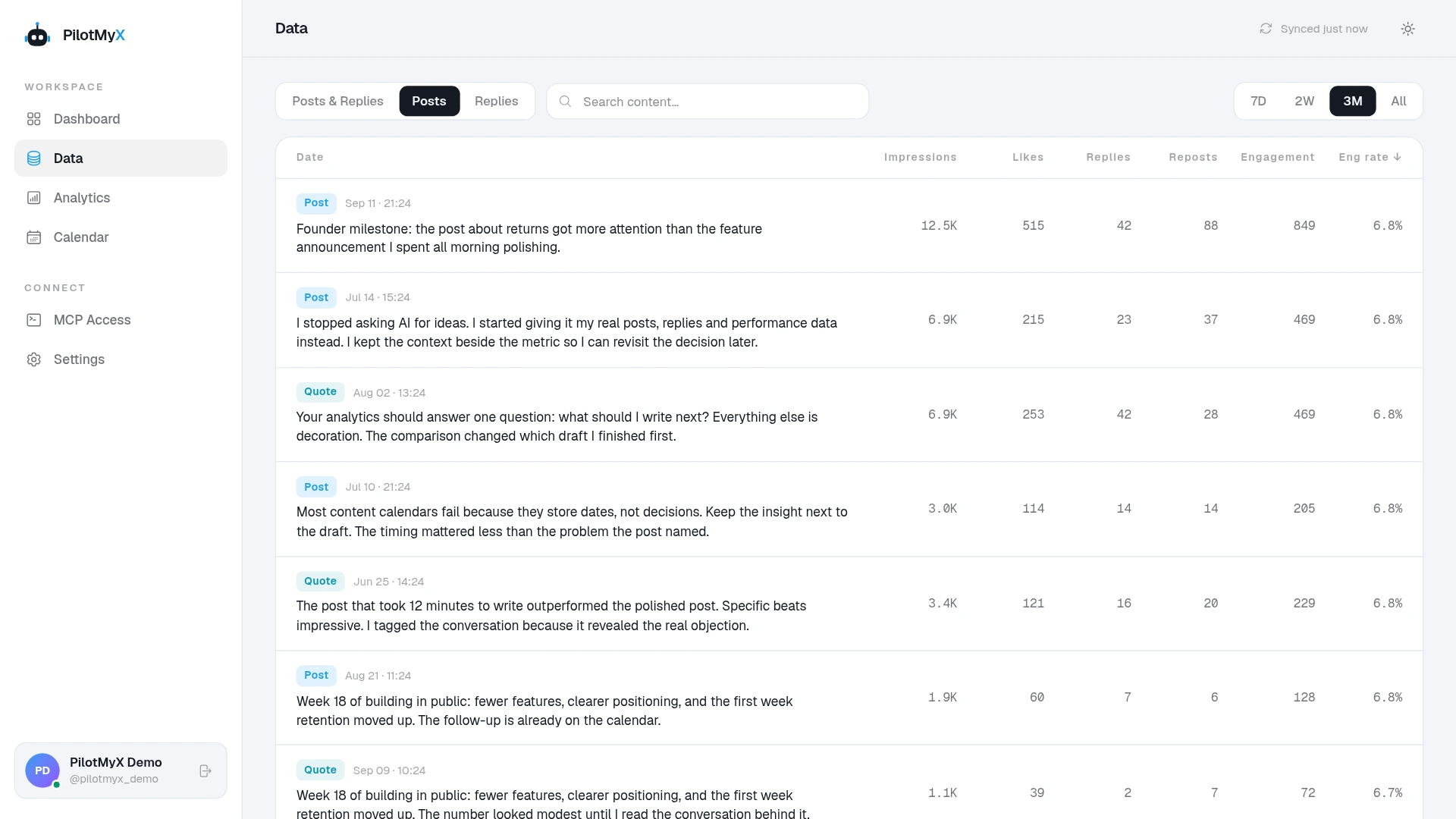
In PilotMyX, open Data, select Posts, choose a complete period, and search for the hashtag text. Read the posts rather than only sorting by the biggest number. Keep a second group of posts on similar subjects without the tag, and check what else changed: the opening, format, media, publication time, or any mention from another account. The search finds posts containing the text; it does not show who discovered them through hashtag search.
X's Post Activity Dashboard documentation describes impressions and engagements at post level as inputs for content planning. Those totals cannot isolate the hashtag either. A tagged post that did better may have had a stronger idea, a different audience, or more time to collect views. The guide to judging a post's performance explains why post age belongs beside any comparison.
Try a small, honest review instead of a fake laboratory test:
| Keep together | Note separately |
|---|---|
| Original posts with a similar purpose and audience | Replies and quote posts |
| Publication dates and current metric freshness | One-off spikes and outside mentions |
| The actual text and any hashtag used | Changes in format, media, or opening |
If several relevant tagged posts bring useful conversations or profile interest, that is a reason to try the approach again. It is not proof that the # character caused the result. If you have only one example, you have a question worth testing, not a rule for your calendar.
Let an agent check the evidence before your next draft
An agent connected to PilotMyX can find tagged posts and read their surrounding account data without turning a guess into a platform fact. Here is a prompt you can adapt:
I am deciding whether to use [hashtag] in an original Twitter post
about [specific subject] for [intended audience]. My goal is [goal].

Using my connected PilotMyX account, review original posts from
[date range] that contain this tag, then find comparable original
posts without it. State the period, sample sizes, data freshness,
and any missing metrics. Keep replies and quote posts separate.

Read the actual posts. Point out differences in subject, opening,
format, and timing before comparing their available results.
Tell me what you observed, what else might explain it, and whether
the tag fits the post I want to write. Do not claim that a hashtag
caused a change in reach. Do not schedule or publish anything.
If the review leaves you unconvinced, publish the clearer post without a tag. If a tag genuinely names the conversation you want to enter, use it sparingly. Then read the replies to see whether the right people understood the point. That is a more useful answer than guessing what the algorithm wanted from a #.
Use your own account