Make sense of your X/Twitter results
Twitter average vs median impressions: read past a viral post
Your average impressions fell, but your usual posts might be doing better. A worked example shows how to read the average, median, and total together.
On this page
Your average can fall while your usual posts improve
One post reaches far beyond your followers. The next few get hundreds of impressions, and your average drops. Before deciding your content stopped working, check how much that one result changed the comparison.
For Twitter impressions, the average measures the total divided by the number of posts. The median describes the middle result after you sort those posts by impressions. A large result can lift the average far above what most of your posts received.
Read both, with the total and post count beside them. The average isn't wrong after a viral post. It answers a different question from the median.
Calculate average and median impressions per post
Use one impression count per post in the group you're reviewing.
- Average, or arithmetic mean: add the counts, then divide by the number of posts with a known count.
- Median: sort the counts from smallest to largest. For an odd number of posts, take the middle count. For an even number, average the two middle counts.
These are the definitions in the NIST guide to measures of location. Extreme values affect the mean more than the median because the median depends on position in the sorted list.
Don't calculate either measure from only your top ten posts. That describes your top ten, not your whole publishing period. Include real zero-impression results; keep unavailable counts separate rather than silently turning them into zero.
A worked example: lower average, higher median
These are fictional groups of seven original posts, with counts recorded at the same post age for the example. They are not account benchmarks or PilotMyX customer results.
Group A, sorted: 280, 340, 390, 420, 470, 520, 9,600 impressions.
Group B, sorted: 440, 480, 510, 560, 590, 630, 710 impressions.
| Group | Posts | Total impressions | Average per post | Median per post | Largest result |
|---|---|---|---|---|---|
| A | 7 | 12,020 | 1,717.14 | 420 | 9,600 |
| B | 7 | 3,920 | 560 | 560 | 710 |
For A, 12,020 divided by 7 gives an average of 1,717.14. The fourth of seven sorted values is 420, so that's the median. In B, both measures are 560.
The average and total fell. The median rose by 33.3%, calculated as (560 − 420) ÷ 420 × 100. B's middle result was higher, but A still produced much more exposure overall. Neither fact cancels the other.
You don't need to remove the 9,600-impression post to calculate A's median. It remains in the group. Keep that success visible and examine what happened around it, rather than either dismissing it or requiring every later post to match it.
Seven posts describe these groups; they don't establish a lasting improvement or explain its cause. The median is not a minimum your next post should reach.
Make the groups comparable before trusting the calculation
Separate original posts from replies first. A busy week of replies changes your account's overall average even if your original posts perform similarly. Our posts versus replies guide explains why their roles and publishing volumes need separate treatment.
Compare similar observation ages. A post published yesterday has had less time to collect impressions than one published two weeks ago. Selecting two equal calendar periods doesn't fix that difference. Follow the post-age review guide before interpreting the gap.
Record when the metrics were captured. Current lifetime counts for posts published last week are not the same as impressions received during last week. If you don't have historical snapshots at a comparable age, describe the comparison as provisional. An agent cannot reconstruct counts that were never recorded.
Check whether any posts were promoted. X's metrics documentation distinguishes organic and promoted metrics; public totals combine them. If your available data doesn't separate those contributions, don't label the comparison an organic-content test.
Impressions also aren't unique people. X's view-count help page explains that repeat views, including your own views, can count. Adding post counts together doesn't produce a unique audience total.
Read PilotMyX's timing medians at the right level
PilotMyX's Analytics timing view lets you select median impressions while keeping the content scope and period visible. Each timing cell summarizes the eligible posts in that local publication-time group.
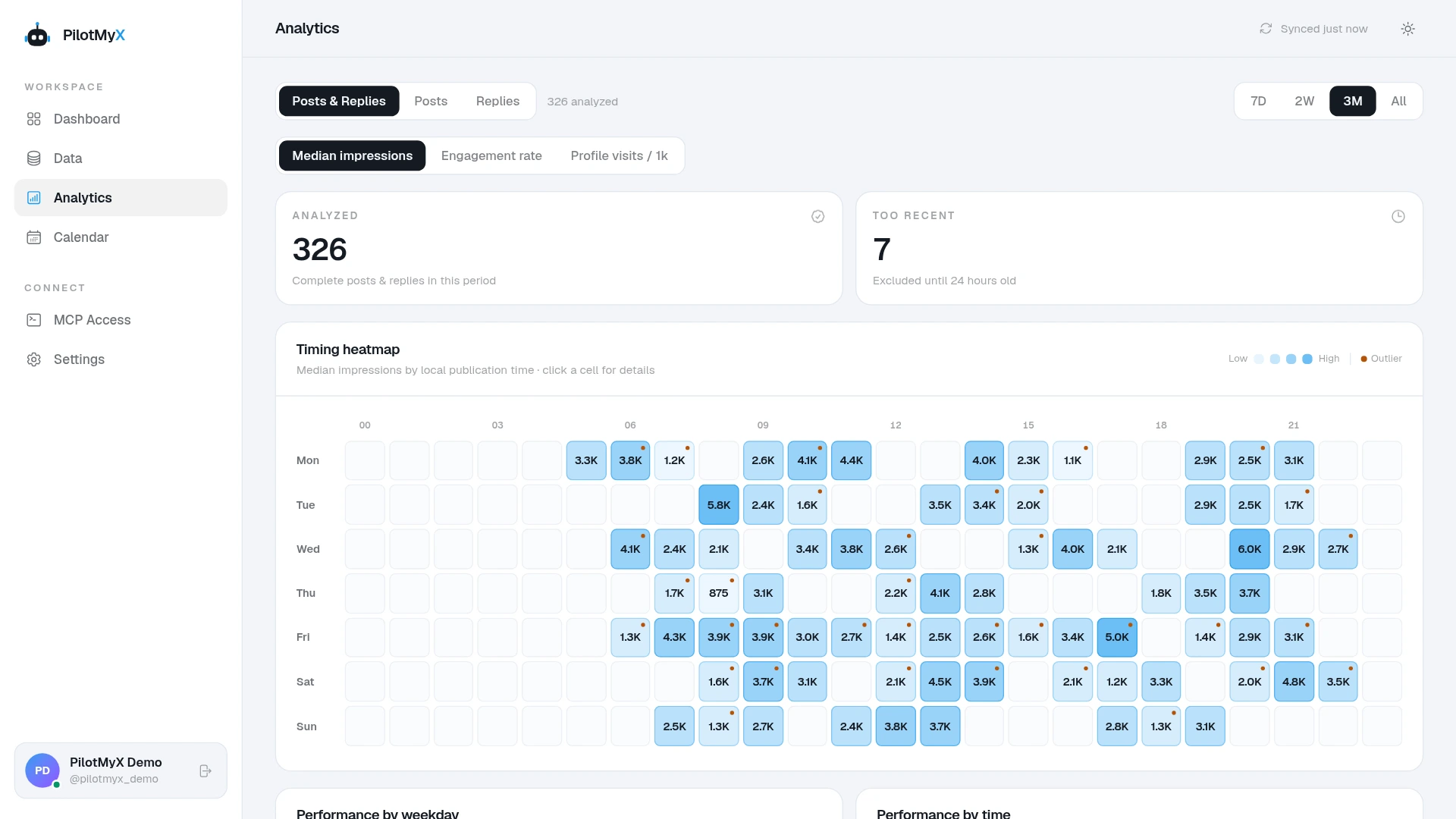
The screenshot shows Posts & Replies selected. Switch the scope when you want to examine posts separately, and inspect the cell details rather than treating a darker square as a guaranteed best time.
Don't average the displayed cell medians to get your account's median. The cells can contain different numbers of posts, and a median of the underlying posts requires those underlying counts. This view helps you inspect timing groups; it isn't the worked example's whole-period report.
For a custom calculation, an agent connected to PilotMyX can read the available posts and calculate the summary. It needs every page of the selected group, not just a list of the strongest results. PilotMyX supplies the data; the connected agent performs this analysis.
Ask for a review that keeps the exceptional result visible
Use this prompt with your connected agent, replacing the dates with the periods you want to examine:
Review original posts published in [period A] and [period B], using my account timezone and only the data already available in PilotMyX. Don't refresh, edit, schedule, or publish anything.

Read every page of each selected group, not only top posts. Report the publication dates, metric observation times, number of posts included, and number with unavailable impression counts. Keep known zeros; don't fill missing counts with zero.

For each group, calculate total impressions, arithmetic mean, median, and largest result from the same included posts. Show enough arithmetic to check the calculation. Keep the largest result included.

Flag differences in post age, promotion context, or incomplete coverage. Don't call lifetime counts impressions earned during the selected period, invent missing snapshots, or claim a cause from this comparison.

Read representative posts near the median and the largest result. Suggest one content test supported by those examples, and explain what remains uncertain. Keep replies separate if you inspect them for context.
Choose the next test from more than the average
If the average fell but the median rose, inspect the posts around the middle before abandoning their subject. If the average rose while the median barely moved, examine the exceptional post without claiming the whole account improved.
When both fall, check comparable posts for changes in subject, opening, format, and audience fit. The broader engagement diagnosis guide helps separate exposure from response.
Keep the purpose of the posts in the review. More impressions may help discovery, but the summary alone doesn't show whether readers visited your profile, followed, clicked, or bought anything. Choose a next post you can test against comparable examples, with a metric that fits its purpose.
Use your own account