Choose your posting hours
Best time to post on X/Twitter: find your own schedule
You put work into a post, publish at a recommended hour, and still get little response. Before rearranging your whole calendar, use your account history to choose two windows worth testing.
On this page
Find a posting time you can trust
To find the best time to post on X/Twitter for your account, compare similar posts in the same timezone, choose two promising time windows, and test fresh posts in both. Judge them after the same amount of time.
That gives you a reason to keep an hour on your calendar. Copying a popular schedule gives you a starting point, but it cannot tell you whether that hour works for the people you want to reach.
If your account is new, choose two hours that fit your intended audience's day and your own availability. Treat them as starting guesses. You can improve the schedule as you collect results.
Why the same hour produces different results
A post published at 9 a.m. does not arrive in every follower's feed at 9 a.m. X describes For You as a mix of followed accounts and recommendations, with signals including interests and interactions in a person's network. See X's explanation of the For You timeline.
That makes a universal posting hour a poor explanation for an individual result. Two posts at the same time can cover different subjects, reach different people, and give those people different reasons to respond.
Timing is still worth testing. It is one part of the decision you can control. Just keep the topic and format in view when you compare results. Our guide to the X/Twitter algorithm explains how a post reaches a viewer beyond the moment you publish it.
Choose a goal and keep the timezone consistent
An hour that brings lots of views may do little for your business. Choose what you want from the next set of posts before picking the winning slot.
For reach, compare median impressions per post. For interest in your work, examine profile visits per post alongside profile visits per 1,000 impressions, when those metrics are available. If you want website traffic, compare link clicks among posts that contain a link, then check signups in your website analytics.
Keep the counts next to the rates. A high click rate on a post with very few impressions may still send fewer people to your site. X defines impressions as appearances on a screen, which can include repeated views by the same person; they are not a count of unique readers. Its metrics documentation also distinguishes impressions from profile and URL clicks.
Use one timezone throughout the analysis and the calendar. For example, if you want to test East Coast business hours, use America/New_York and confirm it in your PilotMyX account settings. Your own local morning may be the middle of the night for that audience.
The timezone lets you compare publication times consistently. It does not tell you where every viewer lives or when all your followers are online.
Before saving the slot, use the time-zone scheduling guide to convert for the publication date and check daylight saving changes. The hour you chose and the hour the editor expects may use different clocks.
Find two candidate windows in PilotMyX
Open Analytics and start with a recent period that contains enough of your usual posts. Four weeks is a reasonable first look if you publish regularly; a quieter account may need longer. Avoid combining periods where your audience, posting habits, or subject matter changed substantially.
- Select Posts to examine your publishing schedule. You can analyze the replies you write separately when you want to understand time spent in conversations.
- Start with Median impressions, or select Profile visits / 1k if profile interest is your goal and the data is available.
- Look at the weekday and time-of-day charts, then open promising cells in the timing heatmap.
- Check how many posts support each cell and read the examples behind it. Note launches, unusual topics, or a single post responsible for most of the impressions.
- Choose two windows worth trying again. Leave empty or sparsely sampled hours undecided.
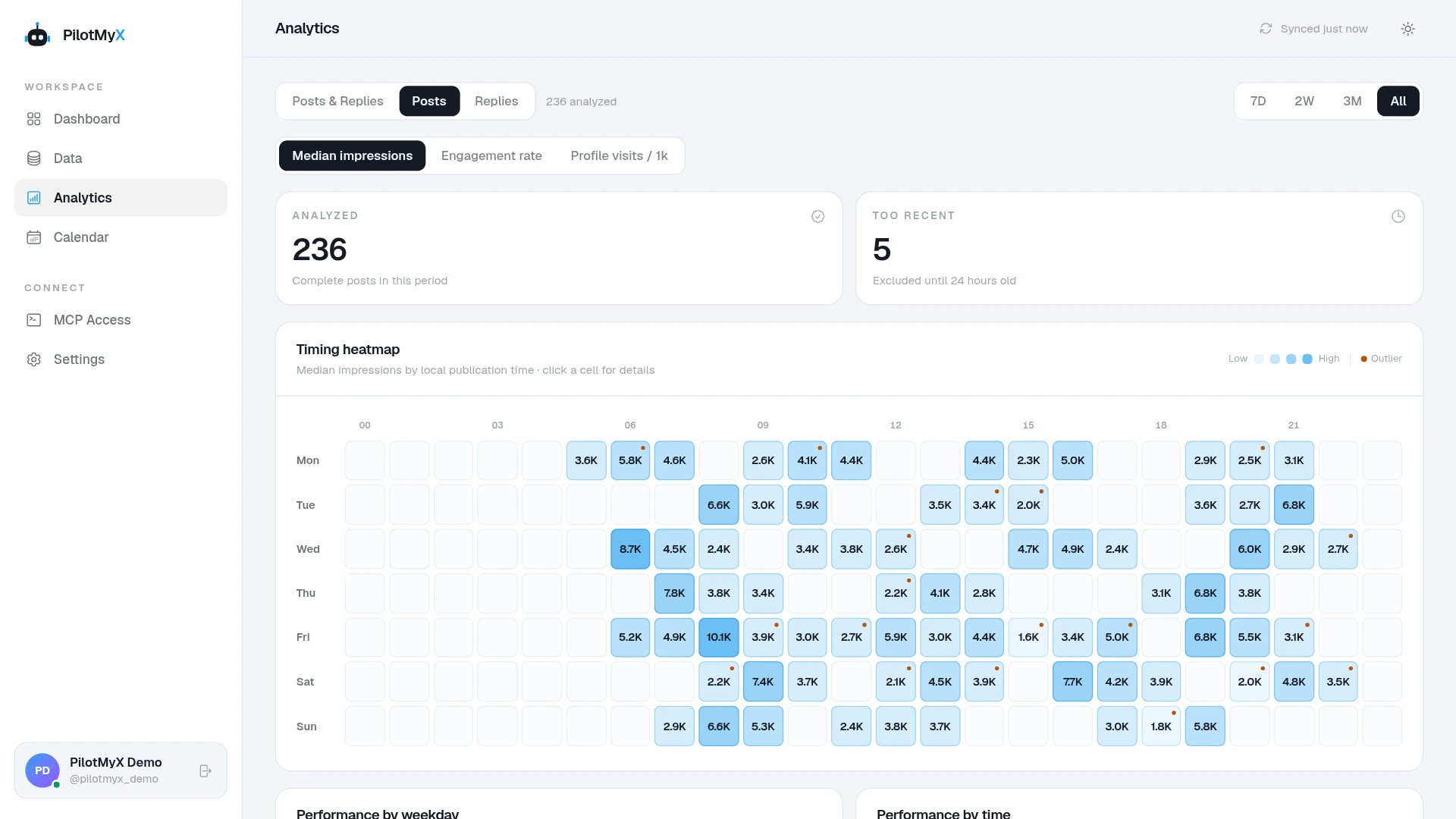
The heatmap groups results by the time you published. It is not a measurement of when followers logged in. A blank cell means you have no analyzed posts for that slot under the current filters, not that the hour is bad.
PilotMyX excludes posts younger than 24 hours from this view. The remaining results use the available collected metrics; they are not automatically a comparison of every post's first 24 hours. Use the history to choose a test, then apply a consistent measurement window to the new posts.
One successful post can change the apparent winner
This fictional example uses eight posts in each window, with every result measured 48 hours after publication. It illustrates the calculation, not results from a PilotMyX customer or the founder's account.
| Publication window | Posts | Average impressions | Median impressions |
|---|---|---|---|
| Morning | 8 | 3,450 | 1,100 |
| Afternoon | 8 | 1,500 | 1,500 |
Morning looks better on average because one post reached 20,000 impressions. The median, the middle of the sorted results, shows that a typical afternoon post did better in this sample.
Afternoon deserves another test. It has not earned a permanent place on the calendar yet: the subjects, formats, and days could still explain the difference. Keep the successful morning post in the review too, and check whether the comparison changes when you set it aside.
Test the hours without changing everything else
Suppose your history suggests trying 9 a.m. and 3 p.m. in the chosen timezone. Those are example hours, not recommended times for every account.
If you normally publish once each weekday, you could rotate them for two weeks:
| Day | Week one | Week two |
|---|---|---|
| Monday | 9 a.m. | 3 p.m. |
| Tuesday | 3 p.m. | 9 a.m. |
| Wednesday | 9 a.m. | 3 p.m. |
| Thursday | 3 p.m. | 9 a.m. |
| Friday | 9 a.m. | 3 p.m. |
Each hour gets a turn on each weekday. Spread comparable topics and formats across both windows instead of putting all your strongest ideas in the one you expect to win. Write different posts; publishing the same text twice changes what repeat readers have already seen.
Keep your normal cadence. If you publish less often, extend the test. Ten posts provide a first comparison, not enough evidence to declare an hour universally best.
Choose a review age in advance, such as 48 hours after each post, and record the metrics at that point. Forty-eight hours is a practical comparison window here, not an X ranking deadline. If you only have current totals, label that limitation rather than pretending older posts had the same time to accumulate views.
Also note anything unusual: a holiday, a product launch, paid promotion, or a large account sharing a post. Those results may be useful, but they need context before you attribute the difference to the clock.
Once the drafts and times are ready, put them in the PilotMyX calendar. Scheduling lets the test continue while you work instead of depending on whether you remember to open X at the right moment.
Ask your agent to do the comparison
If you already use an AI agent, connect it through the PilotMyX setup guide. The agent can examine your account history through MCP and help turn the evidence into a posting plan.
Replace the goal in this prompt with your own:
Help me choose two posting windows to test on X/Twitter.
My goal is [profile visits, reach, or website traffic].

Use my PilotMyX account timezone and start with the last
28 complete days available. Keep posts and replies separate;
focus on original posts for the publishing schedule.

Compare broad time windows before looking at individual hours.
Show the post count, median impressions, and the available
metrics relevant to my goal. Link to examples from each window.

Check whether one outlier, topic, or format explains the lead.
State whether the comparison uses current totals or observations
taken at the same post age. Flag missing data and small samples.

Suggest two windows to test next and explain the evidence for
each. If the history is too thin, propose starting hypotheses.
Do not schedule anything yet.
After reviewing the findings and choosing the posts, use a second prompt:
Use the two windows we selected to plan the approved posts
for the next two weeks at my usual posting frequency.

Rotate comparable topics and formats between the windows.
Check my existing calendar for conflicts. Show the exact post
text and local date, time, and timezone for each slot.

Wait for my approval, then schedule the approved plan through
PilotMyX. Keep the agreed times exact. Include a review plan
for comparing results at the same age after publication.
Review the post examples and sample sizes behind the recommendation before approving the calendar. They should explain why these hours are worth trying on your account.
Decide what to keep after the test
Review the metric you chose at the start, with post counts and examples beside it. Check whether the stronger window holds up across different posts and whether the result depends on one unusual success.
If one window repeatedly brings the kind of attention you want, give it more of your regular posts and keep testing the alternative. If the results are close or inconsistent, choose the hour that fits your working day and put the next experiment into the content itself.
Once you settle on a schedule, use it for your regular posts. Revisit the hours when repeated results give you a reason to change them, or when you start writing for a different audience.
Use your own account